How to Build a Technical SEO ROI Report for Engineering Buy-In
Build a technical SEO ROI report using affected page groups, comparison cohorts and revenue trends to make a credible case for engineering investment.

A site crawl can surface thousands of technical issues without giving an engineering lead a single reason to prioritise them over product work. To earn space on a sprint backlog, an ROI report has to connect a specific fix, its delivery cost and the commercial outcome that followed.
Attribution is the hard part. Revenue often rises after a deployment because seasonal demand increased, stock returned to the warehouse or another team launched a campaign. A credible report tests those competing explanations and separates measured changes from estimated returns. Below, we follow one template fix from baseline to investment decision. All page counts, costs and revenue figures below are illustrative, not results from a customer or study.
One fix and a testable chain of events
Suppose a category template outputs canonical tags pointing to a parent category instead of each page’s intended URL. The affected pages return successful responses, yet send conflicting signals about which URLs should appear in search.
The proposed fix is specific: correct canonical generation for those categories, then verify the output.
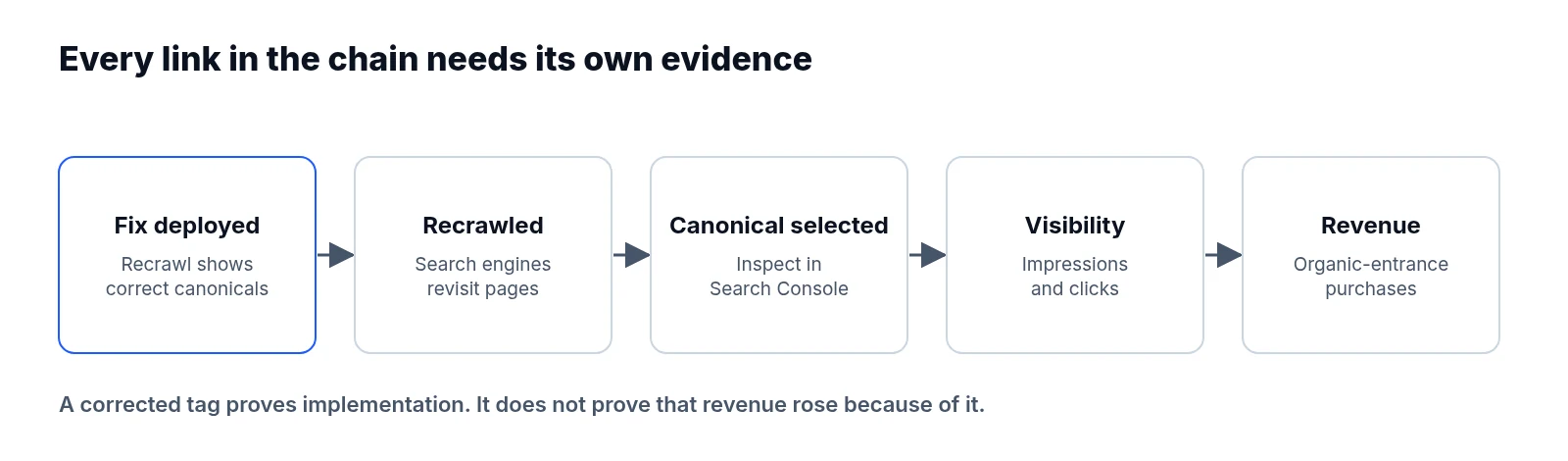
Before development starts, write down the expected sequence of events. Once the deployed template produces the intended canonical URLs, search engines must recrawl the pages and may change their canonical selection. Only then should search visibility and organic entrances improve, allowing purchases from those entrances to generate additional revenue.
Every link in that chain requires evidence. Seeing a corrected tag in production proves implementation, whereas showing that Google selected the intended canonical or that revenue increased because of the change requires separate verification. Agree on the primary outcome, comparison method and review dates upfront, before anyone sees the post-launch results.
Freeze the affected URL cohort at baseline
Export the affected URLs from the baseline crawl and save that file with the report. In this example, the frozen group contains 120 category pages. For each URL, record its status code, declared canonical, indexability directives, template and internal link count, then check representative pages in Search Console to see whether Google’s selected canonical differs from the declared one.
Keep that exact 120-URL group throughout the evaluation. Adding successful pages later or dropping pages that lost traffic distorts the result, so record removals, redirects and new pages separately.
Canonical changes also create a reporting complication: Search Console generally assigns performance data to Google’s selected canonical. Clicks appearing against corrected URLs after deployment may partly reflect reassignment from the parent category rather than additional traffic. Review the former canonical destinations and wider category totals alongside the affected group to see if net visits grew.
What makes an unaffected comparison group credible
Because site-wide demand rarely stays flat, select a comparison cohort that will not receive the fix but faces similar commercial conditions. Match pages on search intent, product demand, country, device mix, traffic scale and historical revenue trends. Another category template on the site may provide a useful comparison if it already generates correct canonicals.
Plot both groups weekly across the baseline window. Different overall revenue levels are acceptable, but sharply different week-to-week trends make the comparison less useful. Exclude pages receiving content rewrites, promotions or other technical changes during the test, and watch for spillover: if the fix shifts traffic from comparison pages to affected pages, the comparison is contaminated. Document why you chose the cohort. If no credible group exists, report a before-and-after observation with weaker attribution rather than presenting an unsuitable cohort as a control.
Baseline windows and revenue definitions
For this example, use eight complete weeks before deployment and eight complete weeks after a predefined two-week transition period. Those windows are illustrative; choose yours around traffic volume, purchasing cycles and expected recrawl delays. Show the transition period directly on the chart, and never quietly remove weak weeks or move the evaluation start to where growth begins.
Build a weekly dataset covering the full sequence:
| Measure | Purpose |
|---|---|
| Crawl failures and canonical output | Confirm the technical change |
| Search impressions and clicks | Track visibility and search visits |
| Organic landing sessions | Measure entrances to each page group |
| Purchases and purchase revenue | Track commercial outcomes |
| Conversion rate and average order value | Explain revenue movement |
Use a consistent acquisition definition across both windows. For example, measure purchases occurring in sessions that entered through the cohort’s pages from organic search. GA4’s landing page report uses session-scoped dimensions, which helps keep this analysis tied to session entrances. State whether organic means Google alone or all search engines, since Search Console’s Google clicks will not equal all organic sessions. Keep currency, timezone, refund treatment and channel definitions consistent, and check for duplicate purchase events, consent changes and missing data. For lead generation, report qualified leads separately from estimated revenue until sales outcomes mature.
Full delivery cost: beyond engineering hours
After delivery, ask engineering for actual time spent on the release, using the same costing basis as other projects. An illustrative cost breakdown might be:
| Work | Cost |
|---|---|
| Engineering: 40 hours at $100 | $4,000 |
| SEO analysis and QA: 10 hours at $100 | $1,000 |
| Release coordination | $500 |
| Follow-up monitoring | $500 |
| Total | $6,000 |
Use an agreed loaded hourly rate, and include incremental infrastructure or tooling costs where relevant, plus maintenance within the evaluation horizon. Avoid allocating an entire annual software subscription to one fix unless that cost was incurred specifically for it. Recording both the estimated cost before approval and the actual cost afterwards helps improve future planning.
Deployment logs and competing explanations
Add the deployment timestamp, release identifier, rollout coverage and any rollback to the timeline, then recrawl the frozen URL list and inspect representative rendered pages. Record when technical acceptance criteria passed, and monitor search behaviour separately—your crawler visiting a page confirms the HTML output, but does not establish that Google has recrawled it.
Across the same timeline, log other events that could affect either cohort. Track pricing, promotions, stock availability and product launches alongside content changes, internal linking updates and new backlinks. Check with platform teams for checkout incidents, tracking changes and consent releases, and note broad search updates or major shifts in demand. When numbers move, investigate timing and mechanism: revenue growth driven by higher order values during a promotion is different evidence from growth accompanied by more organic entrances, and neither automatically establishes causation.
How to estimate lift above the shared trend
Suppose the completed measurement windows show:
| Organic session purchase revenue | Baseline | Evaluation |
|---|---|---|
| Affected pages | $100,000 | $125,000 |
| Comparison pages | $50,000 | $52,500 |
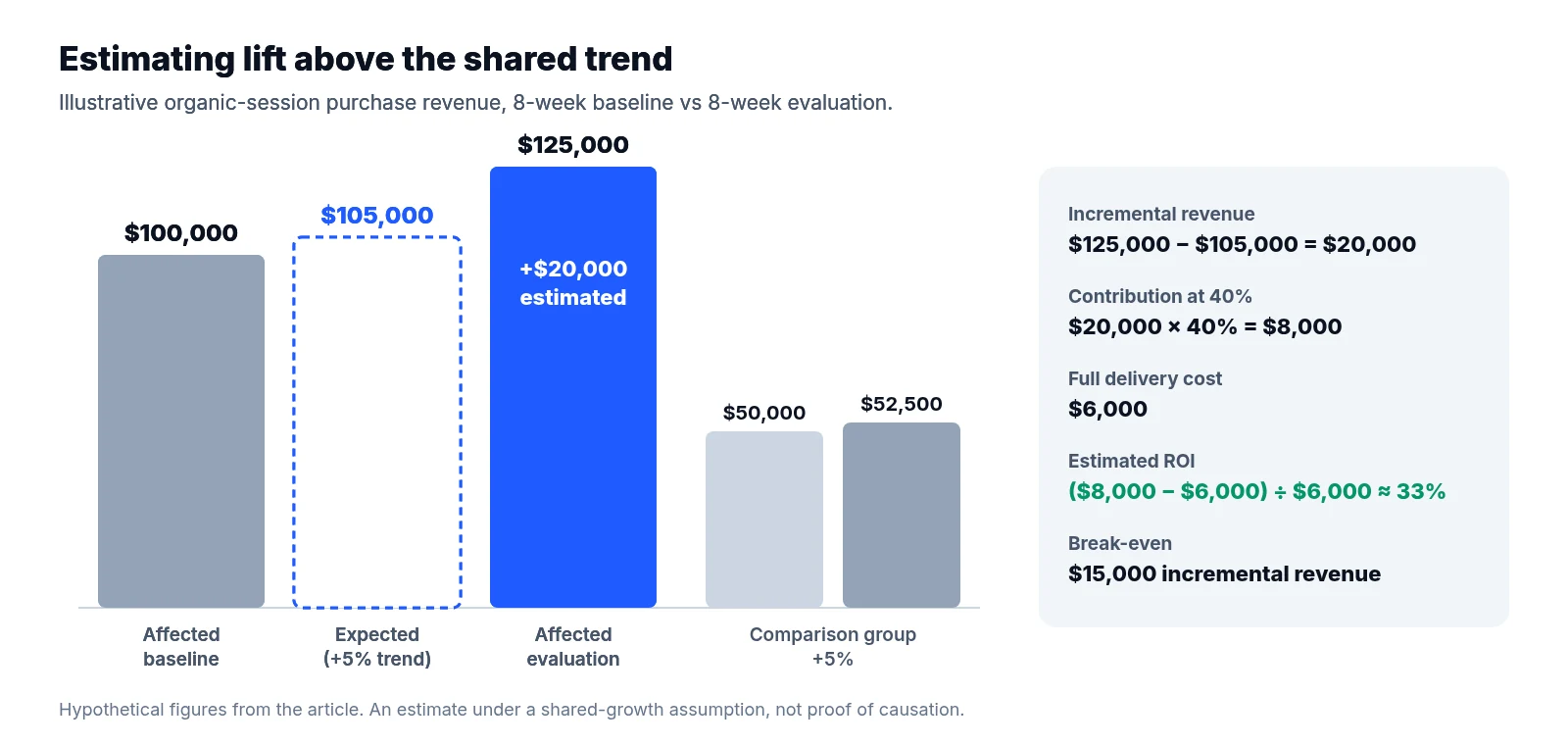
The affected group gained $25,000 while the comparison group grew 5%. A simple comparison-adjusted estimate assumes the affected group would also have grown 5% without the fix:
Expected revenue without the fix = $100,000 × 1.05 = $105,000
Estimated incremental revenue = $125,000 − $105,000 = $20,000
Treat this $20,000 figure as an estimate under a shared-growth assumption rather than proof of $20,000 caused by the release. Show weekly trends alongside the totals, and check whether the conclusion changes with another plausible cohort or comparable measurement window. Because a few large orders can dominate a small dataset, do not attach a statistical confidence interval to the estimate without a defensible uncertainty analysis. Also check site-wide organic revenue for displacement, as category gains may partly replace visits and purchases elsewhere.
Why returns come from contribution, not gross revenue
Gross revenue cannot repay engineering costs directly because variable order costs come out first. Use an agreed contribution margin after relevant variable costs. With an illustrative 40% contribution margin:
Estimated incremental contribution = $20,000 × 40% = $8,000
Estimated ROI = ($8,000 − $6,000) ÷ $6,000 × 100 = 33%
Label this 33% figure as estimated ROI for the measured eight-week evaluation window, and include a downside scenario. If only $10,000 of incremental revenue is supported, contribution becomes $4,000 and ROI is approximately negative 33%. The break-even requirement is $15,000 of incremental revenue at that margin. Treat these figures as sensitivity scenarios rather than probability bounds, and avoid multiplying the observed return into an annual forecast without assumptions about persistence, seasonality and maintenance.
Putting a clear decision in front of engineering
Lead the report with the implementation result, observed revenue change, comparison-adjusted estimate, cost and attribution limits. Link the URL lists, crawl evidence, release record and calculation sheet so reviewers can inspect the work.
For this example, the defensible conclusion is that the fix passed technical checks and the affected group outgrew its comparison cohort. The estimated return is positive under the stated assumptions, while causation remains uncertain. Close with a concrete request: extend measurement, trial the fix on another eligible template or investigate a remaining confounder before expanding.
LiveSolN’s Site Crawler & Technical SEO and Analytics Monitoring & Reporting can bring implementation evidence and revenue trends into the same review. The investment case still rests on a credible comparison, transparent costs and a clear account of what the evidence supports.
Written by
LiveSolN Team
SEOs and analysts with more than a decade in the industry, writing about the monitoring and reporting problems we built LiveSolN to solve.
