Website Incident Report Template: Explain Outages to Marketing Stakeholders
Use a website incident report template to explain outage impact, document the response timeline and give marketing stakeholders clear follow-up actions.

An outage report can be technically accurate and still leave marketing with unanswered questions. Writing that “Checkout returned intermittent errors following a deployment” explains the system symptom, yet it tells marketing nothing about what happened to their traffic or budget. Did paid campaigns keep sending visitors into a broken funnel? Which customer segments were hit? And is the revenue figure floating around Slack a measured loss or a rough estimate?
A practical website incident report template connects technical failures to customer journeys and commercial decisions. Just as importantly, it draws a clear line between what actually happened and what might have happened. That distinction matters most the moment someone asks how many orders the outage cost.
What a marketing-ready incident report needs to cover
Give stakeholders a concise summary backed by evidence they can inspect without parsing raw stack traces. Keep detailed server logs in linked evidence records and use the report itself to explain what those records mean for traffic, conversions, and campaigns.
To keep reporting consistent, include the same core fields every time. Start with the administrative basics: the incident reference, current status, report owner, and last updated time. Next, state the exact impact window, time zone, and detection method, followed by the affected journeys, audiences, and marketing channels. Lay out a chronological response timeline that records campaign decisions alongside engineering steps.
The second half of the report covers outcomes and follow-through. Separate customer impact into observed outcomes and estimated opportunities. Document the technical cause, contributing factors, and the recovery checks used to confirm the site was healthy again. Finally, list corrective actions with owners, deadlines, and acceptance criteria, and note any remaining uncertainty along with when the next update will arrive.
Completed website incident report: illustrative example
Everything in the example below is hypothetical. The times, counts, amounts, and operational details demonstrate how to complete the template; they describe no actual business or incident.
Summary and ownership
Incident: WEB-2026-014
Status: Service restored; corrective actions open
Owner: Web engineering lead
Report updated: 7 October 2026, 12:00 UTC
Customer impact window: 6 October 2026, 10:00–10:42 UTC
Checkout submissions intermittently failed for 42 minutes after a deployment. Customers could still browse products and add items to their baskets, but some could not submit payment.
Engineering restored checkout by rolling back the deployment. Marketing paused paid campaigns during the outage and resumed them once recovery checks passed. Twelve checkout sessions encountered the affected error. Three associated orders were subsequently confirmed abandoned because of the failure, while the remaining outcomes are detailed below.
Detection and affected journeys
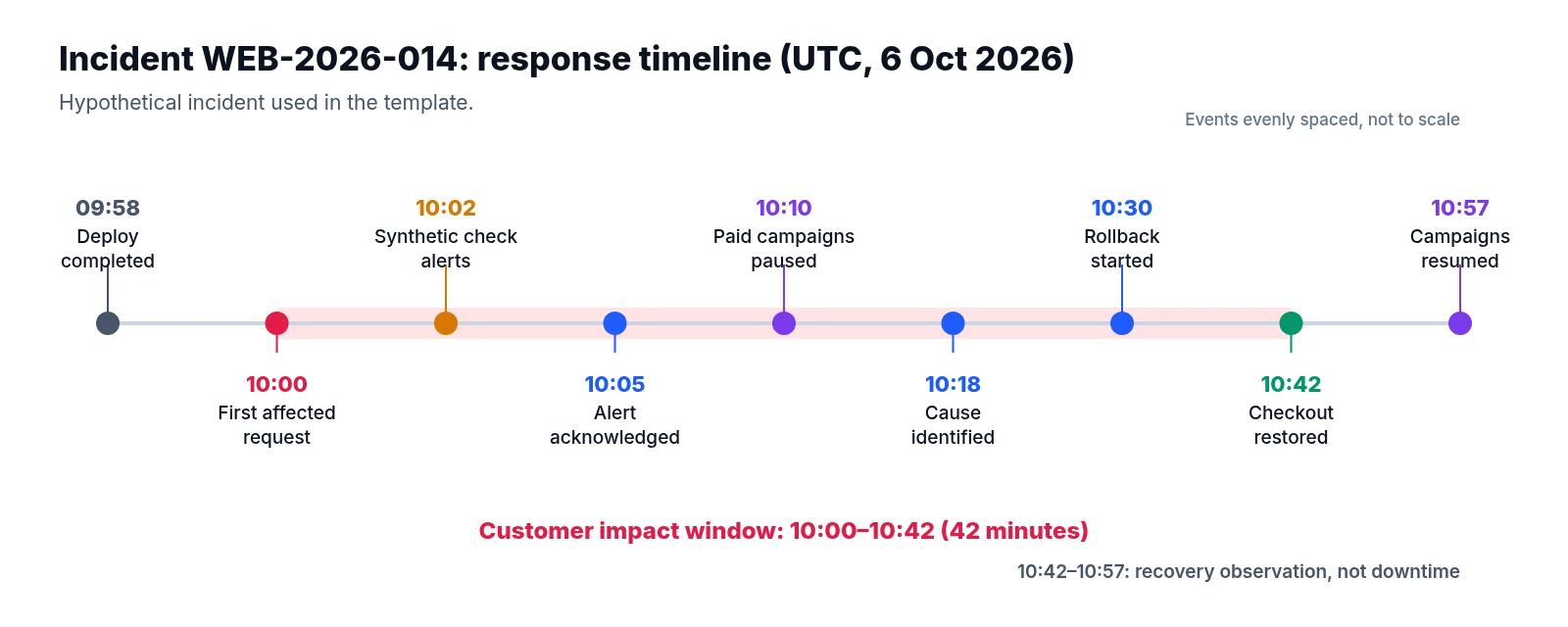
An automated synthetic checkout check alerted at 10:02 UTC, though application logs place the first affected customer request two minutes earlier at 10:00 UTC. The recorded start of the impact window therefore comes from the logs rather than the alert timestamp.
Meanwhile, the homepage availability check stayed green the entire time because it tested a page that still loaded normally and did not cover checkout.
The broken journey ran from basket review to payment submission across both desktop and mobile. Product pages, editorial content, and newsletter signup remained available in the checks performed, and payment-provider records showed no successful charges for the failed submissions. Campaign-tagged checkout sessions appeared among the failures, though channel attribution was incomplete, so the report does not assign every affected customer to a marketing source.
Response timeline
All times are UTC on 6 October 2026.
| Time | Event and significance |
|---|---|
| 09:58 | Checkout deployment completed. |
| 10:00 | First affected request recorded in application logs. |
| 10:02 | Synthetic checkout check alerted the on-call engineer. |
| 10:05 | Engineer acknowledged the alert and opened the incident record. |
| 10:10 | Marketing paused paid campaigns to reduce further exposure. |
| 10:18 | Engineering reproduced the failure and identified a configuration problem. |
| 10:30 | Rollback started. |
| 10:42 | Rollback completed; checkout checks passed and errors returned to baseline. |
| 10:57 | Validation period completed; marketing resumed paid campaigns. |
The customer impact window ends at 10:42. The additional 15 minutes before campaigns restarted served as a recovery observation period rather than confirmed downtime.
Customer impact and observed outcomes
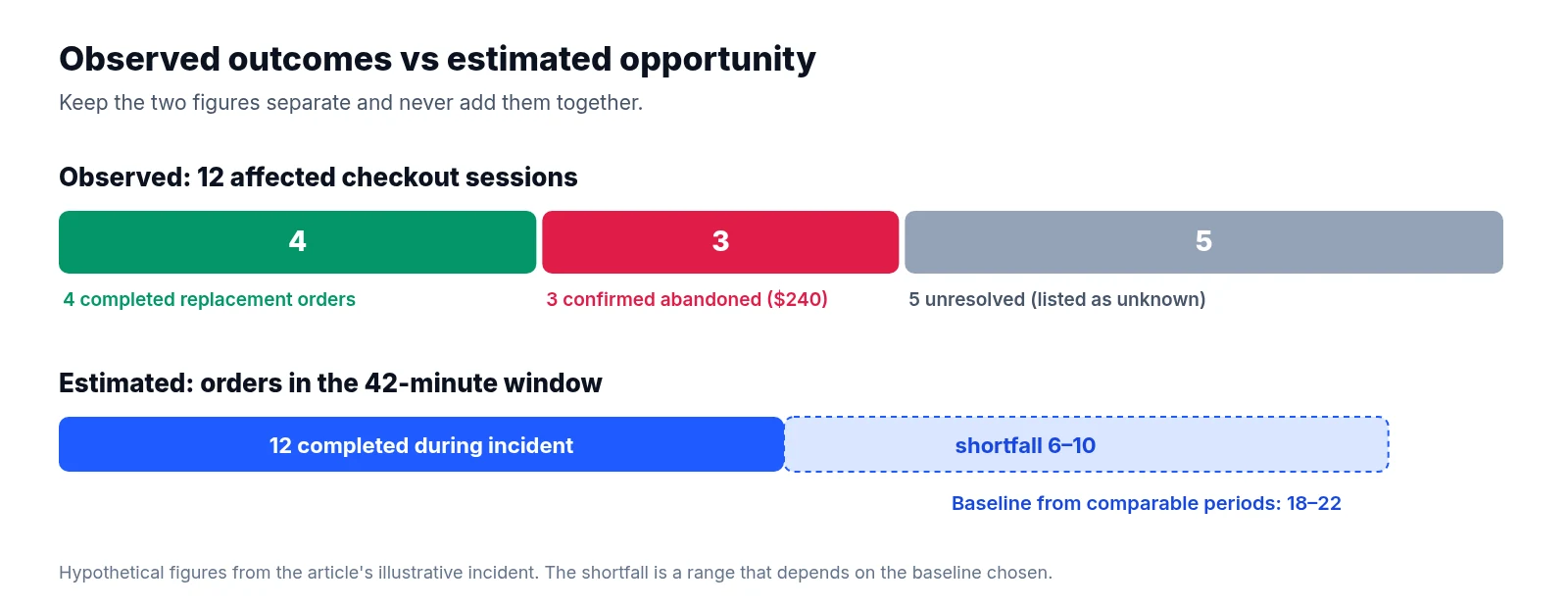
Server records identified 12 distinct checkout sessions with the incident-specific error, which analysts matched to 12 unpaid order records using internal identifiers after deduplicating retries.
By 10:42 UTC the following day, audit checks showed three distinct paths across those 12 sessions. Four customers had returned and completed replacement orders. Three customers explicitly confirmed abandoning their orders because checkout failed, leaving cancelled baskets with a combined value of $240. The remaining five sessions had no matched successful order and no confirmed explanation for leaving.
Only the three confirmed abandonments count as observed lost orders in this report, and the $240 figure reflects their recorded basket value rather than booked revenue or lost profit. The five unresolved outcomes stay listed as unknown. An unmatched record never proves a lost sale on its own, since a shopper might buy through another account, return days later, or decide against purchasing for an unrelated reason. The four recovered orders still count toward the customer friction caused by the incident, even though they are excluded from permanently lost orders.
Cause and recovery evidence
The deployment omitted a required checkout setting on part of the application fleet. Whenever requests reached those instances, the servers returned HTTP 503, indicating temporary service unavailability, before payment submission could complete.
Both the configuration difference and the request logs supported this explanation, and rolling back the release restored the missing setting while eliminating the incident-specific errors. Pre-release checks had covered basic page loading but did not exercise payment submission across the affected configuration, a testing gap that let the faulty change reach production customers.
Before clearing the incident, engineering verified recovery through repeated checkout tests, clean application error logs, and reconciliation with payment-provider records. A successful homepage response alone would never have established recovery.
Corrective actions
| Action | Owner | Due | Completion evidence |
|---|---|---|---|
| Validate required checkout settings before deployment | Platform lead | 9 October | Deployment is blocked when the setting is missing. |
| Add checkout submission to release checks | QA lead | 12 October | Test detects the reproduced failure in staging. |
| Review checkout alert routing | On-call lead | 9 October | A test alert reaches the primary and backup responders. |
| Reconcile the five unresolved outcomes | Analytics lead | 8 October | Updated outcome table with matching limitations documented. |
| Add campaign pause and restart criteria to the incident runbook | Marketing operations lead | 9 October | Runbook reviewed jointly with engineering. |
Restoring service does not close these follow-up tasks. Each item stays open until the owner provides recorded evidence that the fix works.
Estimating missed opportunities without inventing certainty
Observed outcomes tell you what happened to identifiable customers who hit the error. An opportunity estimate asks a different question: what might have happened if the outage had never occurred? Keep those two figures strictly separate.
Returning to our hypothetical example, suppose comparable historical periods suggest 18–22 completed orders would normally occur during that 42-minute window, while the order database recorded 12 completed orders during the incident. Comparing the two gives an estimated shortfall of 6–10 orders during the incident window.
Because that range depends entirely on the baseline chosen, document your reference dates, matching time zone, campaign mix, active promotions, traffic volume, and exclusions. Show enough of your working for someone else to challenge the baseline.
Paid media decisions also shape the math. In this incident, pausing campaigns at 10:10 UTC deliberately reduced incoming traffic. A baseline built on normal campaign delivery estimates the combined interruption to checkout and acquisition, whereas a calculation built on actual incident traffic answers a narrower question and leaves out prospective visitors who never arrived.
Neither calculation proves permanent loss, since some shoppers buy later and normal purchasing behavior fluctuates from hour to hour. Moreover, the three observed abandoned orders may overlap with the 6–10 order estimated shortfall, so do not add them together to produce a larger total. If stakeholders need a monetary estimate, state the assumed order value and accounting basis, label the result as estimated sales opportunity, and note that it excludes any unmeasured effects. Avoid treating basket value, gross sales, profit, and paid media spend as interchangeable measures.
Communicating uncertainty with an owner and a deadline
Writing “Impact remains under investigation” gives stakeholders almost nothing to work with. A useful uncertainty statement names the specific gap, explains its consequence for the numbers, and assigns a clear next step:
Five affected checkout outcomes remain unresolved because no matching later purchase has been found. This limits the confirmed lost-order count. The analytics lead will repeat reconciliation and update the report by 8 October at 12:00 UTC.
Bring the same discipline to uncertain technical causes. Label a working explanation as provisional, record its supporting evidence, and name the specific test needed to confirm it. Real accountability comes from clear ownership and verifiable follow-through: describe the release control that failed, identify the team responsible for improving it, and state how completion will be checked.
Keeping the report useful after recovery
Place the incident annotation directly alongside the campaign and conversion data used in routine reporting. If the outage note lives only in an engineering ticket, a later performance review can easily mistake downtime effects for a drop in audience demand or advertising quality.
A client-ready analytics report can carry the short explanation on the chart while linking to the full incident record for the timeline, evidence, and action register. LiveSolN’s Analytics Monitoring & Reporting and Reporting & Alerts help keep performance data and explanatory commentary together in one place, though the incident owner still needs to reconcile customer outcomes and verify corrective actions.
At the next scheduled review, update the report with resolved unknowns, completed controls, and any overdue work. A restored website ends the immediate disruption; verified evidence that the agreed fixes work is what finally closes the report.
Written by
LiveSolN Team
SEOs and analysts with more than a decade in the industry, writing about the monitoring and reporting problems we built LiveSolN to solve.
