How to Calculate Website Uptime: 99.9% vs. 99.99% Explained
Learn how to calculate website uptime, translate 99.9% and 99.99% into downtime, and report availability without hiding brief outages or maintenance.

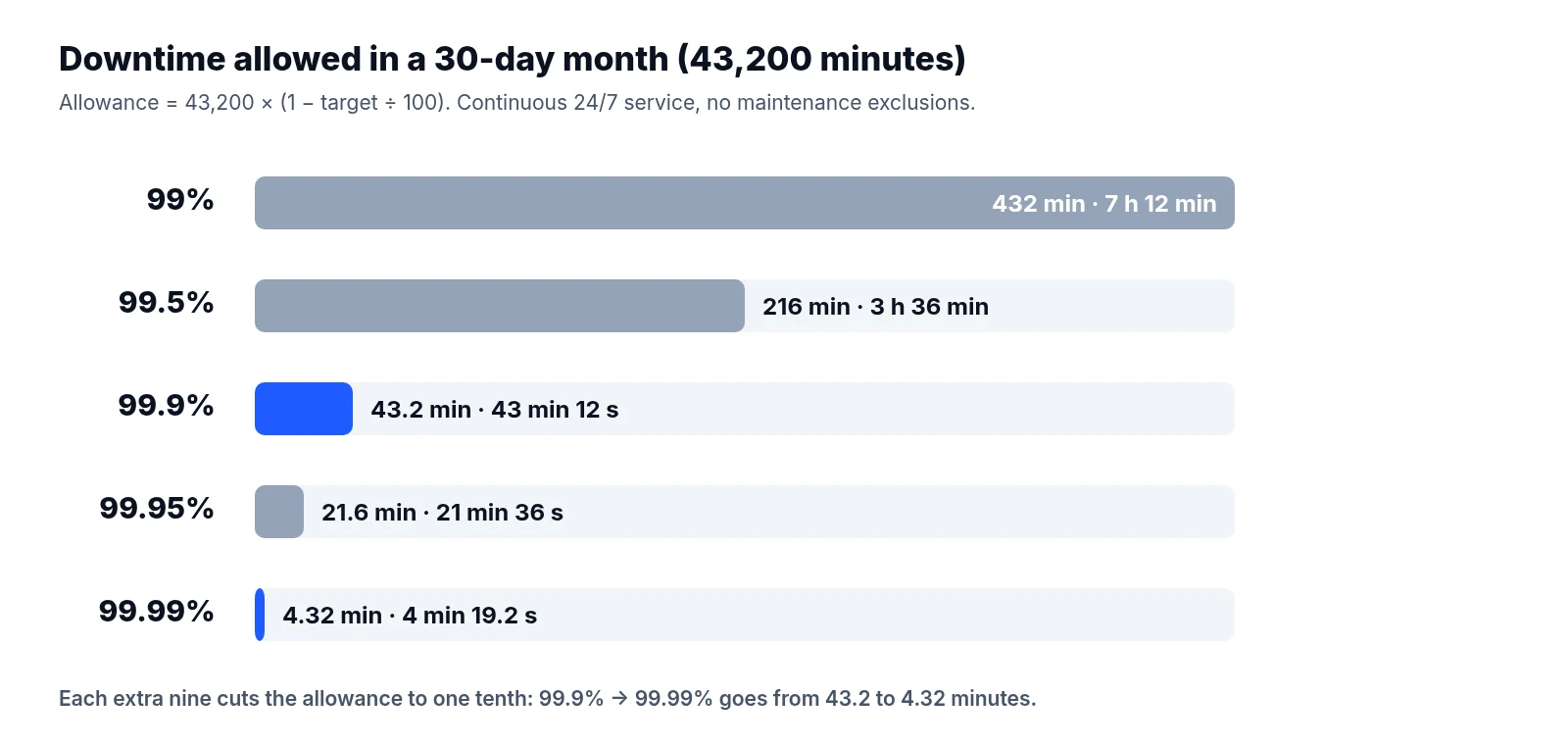
An extra nine looks harmless on a slide deck. In a 30-day month, though, moving from 99.9% to 99.99% uptime shrinks your total downtime budget from 43 minutes and 12 seconds to just 4 minutes and 19.2 seconds.
That gap changes how your team operates. With forty-three minutes to spare, an engineer can get paged, open a laptop, read the logs, and roll back a bad release before the monthly target is in danger. With four minutes and change, a slow alert or a manual runbook will blow the budget before anyone even logs in. It dictates how fast you must detect failures, how you schedule maintenance, and what kind of evidence your monthly availability report has to show.
The math itself is simple. The arguments start when you have to define what "up" actually means. A marketing homepage can return a clean response in fifty milliseconds while the checkout database is rejecting every credit card, and an external monitor checking every five minutes can sleep right through a brief outage. If you want an uptime number that holds up under scrutiny, you have to get the arithmetic and the definitions right at the same time.
The basic uptime formula and where teams trip up
When you measure availability by time, the calculation compares the time your service was working against the total time it was supposed to be working:
Uptime percentage = ((total eligible time − downtime) ÷ total eligible time) × 100
Keep your units consistent from start to finish. If you define your reporting window in minutes, convert every outage duration into minutes before you add them together, including partial minutes measured in seconds.
For a website that is expected to run around the clock with no excluded hours, a standard 30-day month gives you:
30 × 24 × 60 = 43,200 minutes
Take an illustrative example where your site suffers three separate outages during the month lasting 4, 6, and 8 minutes. Your combined downtime is 18 minutes. Plugging that into the formula gives:
((43,200 − 18) ÷ 43,200) × 100 = 99.9583%
That result comfortably clears a 99.9% target, and it misses a 99.99% target by a wide margin.
Even at this basic level, raw alert logs will mislead you if you do not clean them up first. Count the combined duration of overlapping incidents only once for the same service. If a database failure triggers both a checkout alert and an API alert for the exact same ten-minute window, the service was down for ten minutes, not twenty. You also need to clip incidents cleanly at reporting boundaries. When an outage starts at 23:50 on the last day of the month and ends at 00:15 on the first of the next month, split those twenty-five minutes across the two periods so each month carries only its own downtime.
What 99.9% and 99.99% actually look like in minutes
Most teams start with an availability target in a contract or an internal goal and need to work backwards to find their maximum allowable downtime:
Downtime allowance = total eligible time × (1 − target percentage ÷ 100)
At 99.9% availability, the unavailable fraction is 0.001. At 99.99%, that fraction drops to 0.0001. Because calendar months vary in length, your actual allowance in minutes shifts depending on the calendar.
| Reporting window | Total minutes | Downtime at 99.9% | Downtime at 99.99% |
|---|---|---|---|
| 28-day month | 40,320 | 40.32 minutes | 4.032 minutes |
| 30-day month | 43,200 | 43.2 minutes | 4.32 minutes |
| 31-day month | 44,640 | 44.64 minutes | 4.464 minutes |
| 365-day year | 525,600 | 525.6 minutes | 52.56 minutes |
Run the numbers across a full 365-day year and the contrast is stark:
525,600 × 0.001 = 525.6 minutes, or 8 hours, 45 minutes, and 36 seconds.
525,600 × 0.0001 = 52.56 minutes, or 52 minutes and 33.6 seconds.
Every figure in that table assumes continuous 24/7 service with zero excluded maintenance time. Remember that a leap year has 366 days (527,040 minutes), so you should calculate its allowance from that longer duration rather than reusing the 365-day figure.
One common misconception is worth clearing up when presenting these numbers to non-technical stakeholders. Moving from three nines to four nines allows one tenth as much downtime, but it does not make the website ten times faster. Availability measures whether the service is reachable and functioning, not how quickly pages render under normal load.
Why the reporting window changes the math
An annual target and a monthly target answer very different questions. A terrible month with two hours of downtime will blow past a 99.9% monthly target, yet that same outage can easily hide inside a quiet twelve-month period that still meets its 99.9% annual goal.
Do not treat an annual downtime allowance as a shared pool you are allowed to burn through in a single bad week when your service agreement or internal target applies monthly. You also need to be explicit about whether you track calendar months or a rolling 30-day window. A rolling 30-day window shifts its start and end boundaries every single day, which means an outage drops out of the calculation thirty-one days after it happens rather than on the first of the next month.
Write down the exact boundary timestamps and the timezone governing your reports. Using UTC avoids daylight-saving headaches altogether. Another local timezone can still work, provided your math accounts for the actual elapsed minutes during spring-forward and fall-back transitions instead of assuming every day has 24 hours.
When you roll several months up into a quarterly or annual summary, add up the raw downtime minutes and divide by the sum of the eligible minutes across those months. Never take a simple average of the monthly percentages. Averaging February's percentage equally with March's gives a 28-day month the exact same statistical weight as a 31-day month, which skews the multi-month figure.
Check intervals and the five-minute blind spot
Synthetic uptime monitors do not watch your site continuously. They probe an endpoint at fixed intervals and know nothing about what happened in the gap between probes.
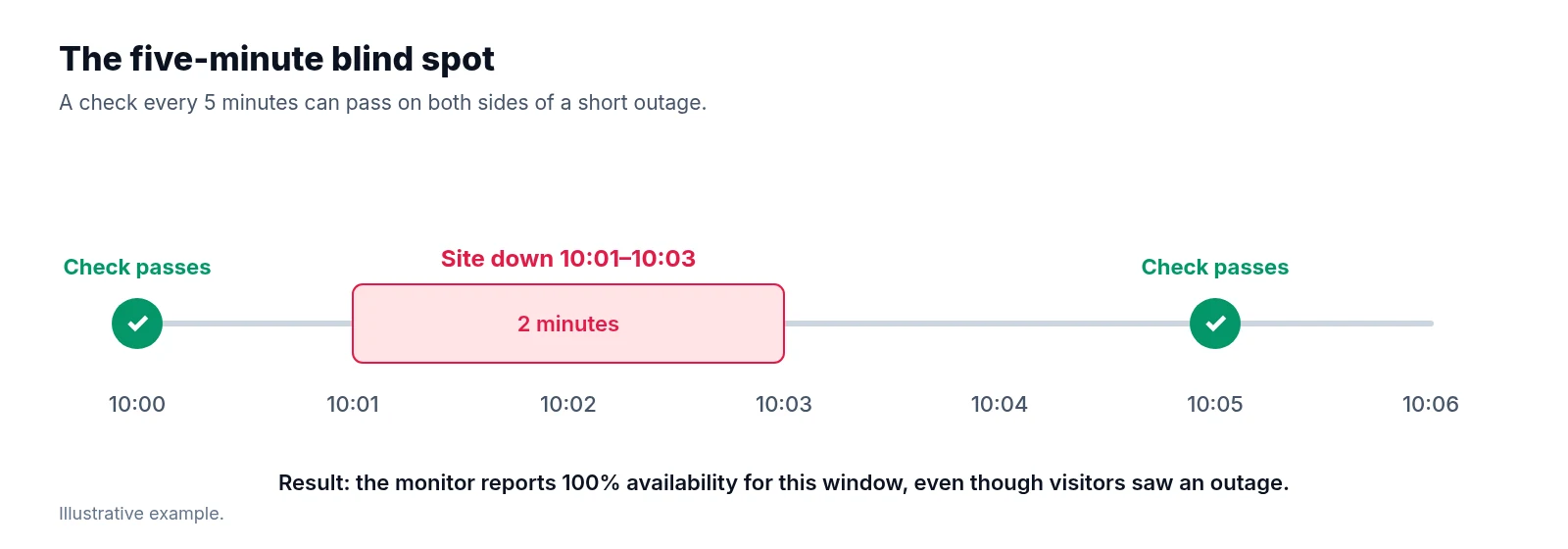
Consider an illustrative example where a monitor runs every five minutes. The check at 10:00 succeeds, and the check at 10:05 also succeeds. Between 10:01 and 10:03, however, a bad configuration deploy takes the site offline for two full minutes. Because the recovery finished before the 10:05 probe arrived, both checks pass and the monitor logs 100% availability.
A five-minute check interval can miss a two-minute outage completely—an incident that actually consumed nearly half of a 99.99% monthly allowance.
Shortening the check interval to sixty or thirty seconds narrows that blind spot, though you still have to interpret the timestamps carefully. When a probe fails at 10:01 and the next probe succeeds at 10:02, the real recovery happened somewhere inside that sixty-second window. Your team should document whether incident duration is calculated from raw check timestamps, midpoint estimates between probes, or server-side log timestamps.
It also helps to separate two related metrics that monitoring tools often blur together. Time-based uptime divides the estimated available duration by the total eligible duration. Check success rate, by contrast, divides the number of successful checks by the total number of completed eligible checks. When probes run at a steady, uninterrupted cadence, check success rate approximates time-based availability reasonably well. It remains a sampled measurement, though, and irregular probe intervals, automatic retries, or dropped monitoring results will distort it.
Keep your paging rules separate from your measurement rules. Requiring two or three consecutive failed checks before waking up an engineer is a sensible way to cut down on false alarms, but once an outage is confirmed, your uptime calculation must include those initial failed observations. And if your monitoring tool itself goes dark or fails to record data for twenty minutes, report that gap as unknown time and display your monitoring coverage percentage; do not silently count missing data as healthy uptime.
When the homepage is up but checkout is broken
Relying on an HTTP status code alone is one of the fastest ways to overstate availability. A web server can return an HTTP 200 status code while rendering a database connection error on the page, and a cached homepage can load fine while login, search, or payment endpoints are completely dead.
Instead of checking a single URL, define clear success criteria for each important user journey. Specify the expected HTTP response, the required page content or completed transaction, and the timeout threshold after which a slow response counts as a failure. Decide up front whether severe latency is scored as downtime or tracked in a separate performance metric so you are not debating it after a slow afternoon.
Partial failures are much easier to explain when you look at them from three angles rather than forcing everything into one site-wide number. Report availability separately for each critical user journey, break out results by monitored region whenever an issue affects visitors in one geography more than another, and—where your logging and telemetry support it—calculate request-based availability by dividing successful eligible requests by all eligible requests. Google’s discussion of availability measurement explains why request success rates often capture partial outages far better than time-based checks when a service degrades for a subset of traffic.
In an illustrative example, suppose 10,000 eligible checkout attempts occur during a window and 200 of them fail. Checkout request availability is 98%, even if your synthetic homepage monitor passed every check during that same period. Notice that you cannot translate that 98% request figure directly into outage minutes unless you also know when those requests arrived and how traffic volume shifted during the incident.
If you use request-based metrics, define what counts as an eligible request ahead of time, including how you filter out expected client errors (such as 404s) and automated bot traffic. Avoid averaging the availability percentages of different journeys equally unless that equal weighting reflects an explicit, agreed business decision.
Accounting for planned maintenance without hiding it
From a visitor's perspective, a site that is offline for a scheduled database upgrade is just as unavailable as a site that crashed unexpectedly. Because planned maintenance still affects users, you should always publish raw availability that includes maintenance alongside any adjusted figure that excludes approved maintenance windows.
We can extend our earlier illustrative 30-day example to see how both numbers work. Alongside the 18 minutes of unplanned downtime, suppose the website is taken offline for a separate, approved 60-minute maintenance window, bringing total unavailability to 78 minutes.
When you include maintenance, availability for the 30-day month is:
((43,200 − 78) ÷ 43,200) × 100 = 99.8194%
If your reporting policy excludes the entire approved 60-minute maintenance window, you subtract those 60 minutes from the total eligible time in the denominator, leaving 43,140 eligible minutes, and remove the 60 maintenance minutes from the downtime in the numerator. Your adjusted availability is:
((43,140 − 18) ÷ 43,140) × 100 = 99.9583%
That adjusted percentage is valid only because it describes a narrower measurement window. Present both figures side by side in your report and state clearly that 60 minutes of scheduled maintenance were excluded from the adjusted calculation.
Set the ground rules for maintenance before the quarter starts: which windows qualify, who has to approve them and with how much notice, and how overruns are scored. If a 60-minute approved window stretches to 75 minutes, the extra 15 minutes should count as unplanned downtime. And when you exclude an approved window, remember to remove its duration from the denominator as well as any downtime inside it from the numerator. Above all, never rewrite the maintenance policy after looking at the month's numbers.
An availability worksheet to settle definitions early
The worst time to debate how uptime is calculated is the morning after an outage. Sit down with the people responsible for operations, reporting, and customer experience to fill out this measurement worksheet, and attach the approved rules to every monthly report.
| Decision | What to record |
|---|---|
| Service scope | Domains, endpoints, critical journeys, and regions covered |
| Success criteria | Expected response, content or action, and timeout |
| Reporting window | Start, end, timezone, and calendar or rolling basis |
| Availability target | Percentage and the period it applies to |
| Observation method | Check interval, locations, retries, and request telemetry |
| Incident timing | Start and recovery rules, overlap handling, and boundary treatment |
| Partial failures | Journey breakdowns, regional rules, and any weighting |
| Maintenance policy | Approval process, excluded duration, and overrun treatment |
| Missing data | Unknown-time policy and monitoring coverage calculation |
| Reporting owner | Who verifies incidents and approves corrections |
Alongside the final percentage, record the raw calculation inputs in every report: total eligible duration, unplanned outage duration, excluded maintenance minutes, and unknown monitoring time. Anyone reading the report should have enough detail to plug those four numbers into a calculator and reproduce your exact percentage.
Reporting numbers that match what visitors experienced
A single headline percentage rarely tells the whole story of how a month went. Pair your availability percentage with total downtime minutes, the number of distinct incidents, the duration of the longest incident, which user journeys were affected, your monitoring coverage, and any maintenance exclusions. When comparing results against a target, always evaluate the unrounded figure; rounding 99.986% up to 99.99% on a slide deck should never turn a missed target into a pass.
Tie your monthly availability review directly to the incident logs from your daily website health check so brief failures do not get forgotten by the end of the month. If your team uses LiveSolN for Analytics Monitoring & Reporting or Site Crawler & Technical SEO, bring those reports into the same review to see how outages or degraded journeys affected organic traffic, conversion rates, and crawl errors around the incident window.
Good uptime reporting comes down to discipline before the outage happens. Calculate availability from a fixed window and a documented failure rule, remember that four nines leaves one tenth the downtime of three nines, keep brief failures, partial outages, and unmonitored gaps in plain view, and publish maintenance exclusions right next to your unadjusted numbers. Agree on the worksheet while everything is running smoothly, and your monthly report will reflect what visitors actually experienced instead of sparking an argument over the math.
Written by
LiveSolN Team
SEOs and analysts with more than a decade in the industry, writing about the monitoring and reporting problems we built LiveSolN to solve.

