Uptime vs. Synthetic vs. Analytics Monitoring: What Each Actually Catches
Compare uptime checks, synthetic journeys and analytics monitoring to choose the right coverage for landing pages, lead forms and e-commerce checkouts.

A website can return a successful response while its checkout rejects every payment. A contact form can display a thank-you message on the screen without delivering a lead to sales. Orders can keep arriving in the backend while the analytics purchase event quietly stops firing.
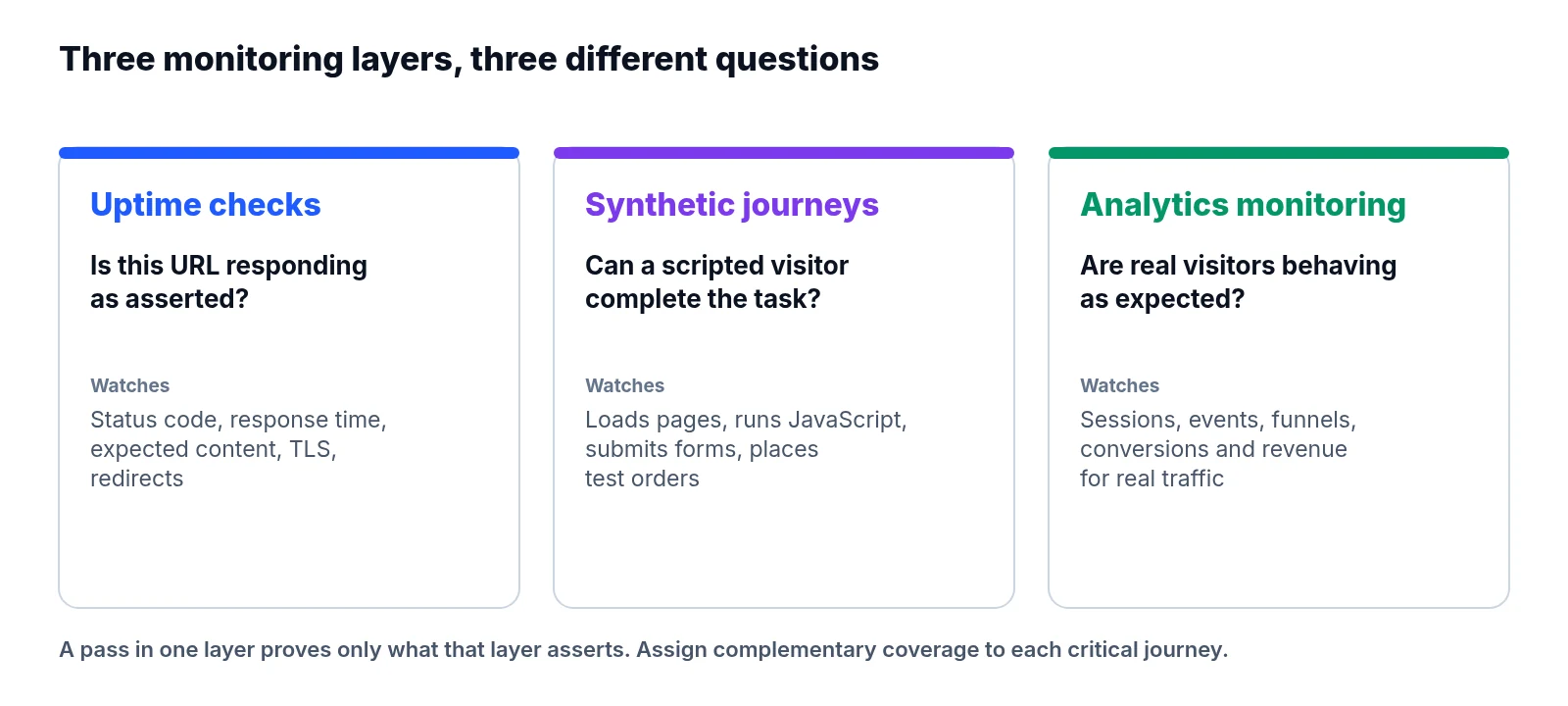
Catching each failure requires a different kind of evidence. Uptime monitoring checks whether an endpoint responds as expected when polled. Synthetic monitoring steps through a scripted task to test whether an interaction works. Analytics monitoring watches recorded visitor activity and business outcomes over time.
Picking one method over the others misses the point. You need to know which specific failures each approach detects, and where your most valuable customer journeys still have blind spots.
What the three methods actually measure
Endpoint availability and uptime checks
A typical HTTP uptime check requests a URL and checks its status code, response time, and, optionally, expected content on the page. Depending on configuration, it can also flag connection failures, certificate problems, and unexpected redirects.
Treat this as your first layer for availability. Point checks at important public URLs rather than relying only on an internal health endpoint that might stay healthy while the customer-facing site fails. Even then, a passing check proves only what it explicitly asserts. A page returning HTTP 200 might still show an error message, load an empty application shell, or render a checkout button that does nothing when clicked.
Technically, uptime checks are a simple form of synthetic testing. In day-to-day operations, though, “synthetic monitoring” refers to scripted journeys that go beyond a single request. Google Cloud’s monitoring overview describes both approaches and their different scopes.
Scripted tasks in synthetic monitoring
A browser-based synthetic journey loads pages, runs JavaScript, and performs actions such as submitting a form or placing a test order. Controlled repetition is its main advantage. A synthetic script can run the same journey overnight, before real customers arrive, and identify the exact step that failed.
Coverage is where it hits a ceiling. A passing desktop test with one account, product, and payment method says nothing definite about mobile visitors, shoppers in another delivery region, or customers using a different payment provider.
Recorded outcomes in analytics monitoring
Analytics monitoring watches sessions, events, funnel progression, conversions, and revenue for unexpected changes. Because it reflects activity across real visitors, it can expose problems that scripted tests miss. Standard business analytics is not automatically real user performance monitoring, however; capturing browser errors and page timings requires suitable instrumentation.
Analytics also depends on collection and processing staying intact. A conversion drop could stem from a broken journey, less qualified traffic, or missing measurement. The alert starts an investigation, but it does not establish the cause on its own.
How failures show up across tools
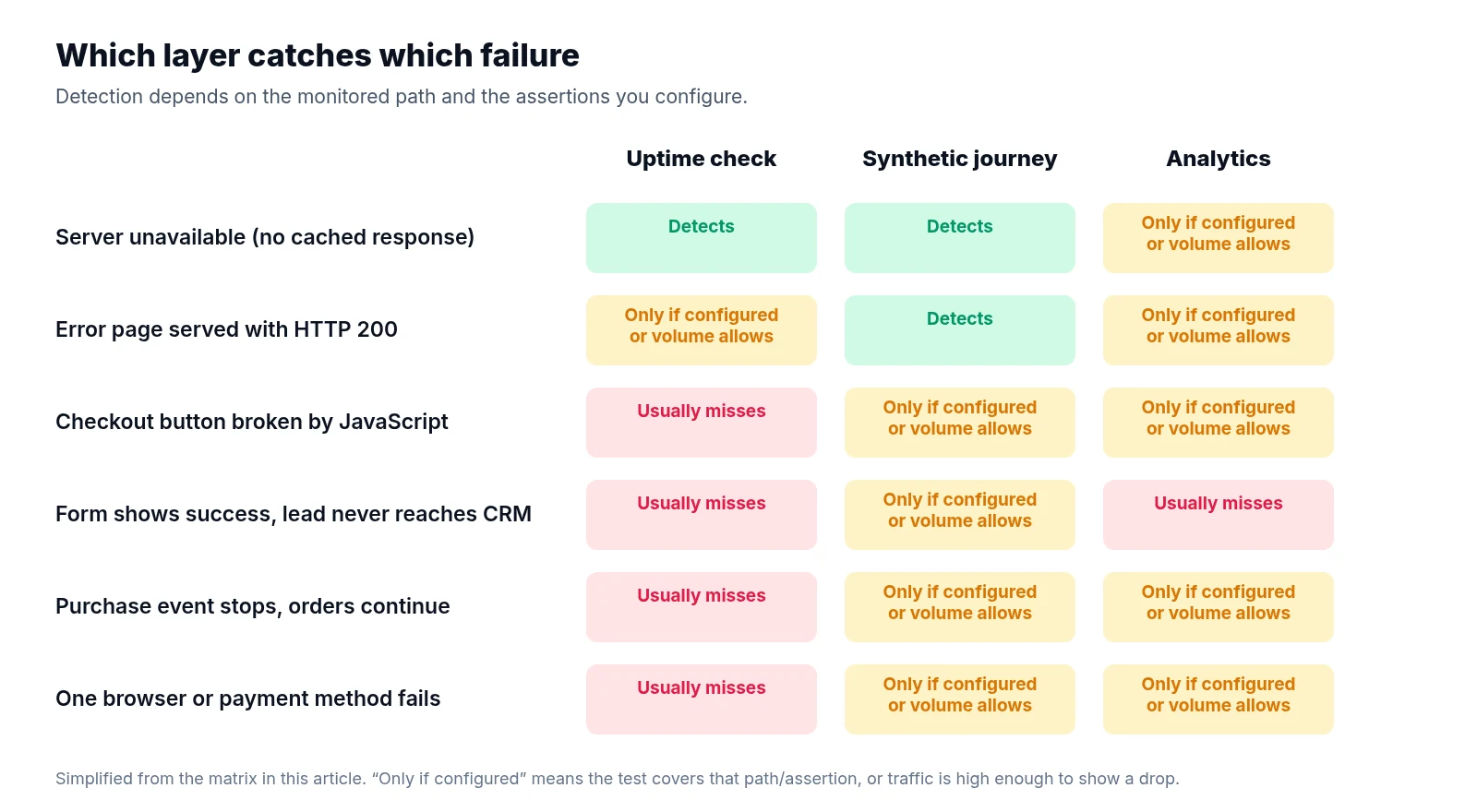
This matrix assumes a basic HTTP uptime check, a browser journey with explicit assertions, and analytics alerts based on collected visitor events.
| Failure | Uptime check | Synthetic journey | Analytics monitoring |
|---|---|---|---|
| Server unavailable, with no working cached response | Detects failure on the checked URL | Fails when it reaches the affected page | May show falling activity after collection and processing |
| Error page returns HTTP 200 | Misses it unless content is checked | Detects it if expected content or actions fail | May show reduced engagement or conversions |
| Checkout button fails because of JavaScript | Usually misses it | Detects it when that interaction is tested | May show checkout abandonment |
| Form displays success but no lead reaches the CRM | Usually misses it | Detects it only with a downstream delivery assertion | May miss it if the success event still fires |
| Purchase event stops firing while orders continue | Misses it | Detects it only if measurement is explicitly tested | May flag missing events; order records help confirm the cause |
| One browser or payment method fails | Usually misses it | Detects it only in a matching test | May reveal a segment-specific drop if volume is sufficient |
Whether a tool “detects” a problem always depends on the monitored path and assertion. Even an unavailable origin server can hide behind a working CDN cache. A successful cached homepage response does not prove that checkout APIs are healthy.
Build coverage around customer journeys
Start with the actions that create value. For each one, write down the entry page, critical steps, expected outcome, and the system that confirms completion. The following examples are illustrative coverage plans rather than customer case studies.
Campaign landing pages
Loading the page is only the first requirement. For a campaign landing page, add an uptime check for the public URL that verifies expected content, which helps catch an error template that still returns a successful status code.
Next, script the primary action in a synthetic test: opening the booking widget, following the offer link, or reaching the enquiry form. Assert that the intended destination or interface actually appears. Pair this with analytics monitoring to watch landing-page visits and progression to that action, segmented by campaign and device where volume allows. A healthy page with fewer visits may point to a campaign delivery problem, while normal visits with collapsing progression deserve a journey investigation.
Lead generation forms
An uptime check confirms that the form page responds, while a synthetic journey should fill required fields, submit valid test data, and verify acceptance. Where possible, confirm that the test submission also reaches the receiving system. A browser thank-you message cannot prove that an email notification arrived or a CRM record was created. Give test leads a recognisable marker, route them away from normal sales follow-up, and keep personal information out of test submissions.
Analytics should record successful submissions at a meaningful acceptance point. Compare those events with accepted backend submissions or CRM records. The counts may differ because of consent and collection limits, but an abrupt change in their relationship deserves attention.
E-commerce checkouts
A journey that adds an item to the basket tests only part of checkout. Define what “complete” means for your test and choose the boundary deliberately: delivery calculation, payment authorisation, or confirmed order creation. Assert the expected result at that boundary, and keep products and accounts stable so an unavailable test item does not repeatedly masquerade as a site incident.
Sandbox payments only test the sandbox integration; they do not prove that live payments work. Any production transaction test needs an agreed method for handling charges, stock, fulfilment, and cleanup. Meanwhile, use analytics to watch progression between basket, checkout, and purchase, comparing recorded purchases with order-system totals to help separate transaction failures from measurement failures.
When analytics goes quiet, check the evidence
Zero recorded conversions is ambiguous on its own. It becomes useful when paired with independent signals.
Work through three questions when numbers drop. First, can the journey still complete? Run the synthetic test and inspect its assertions. Second, are outcomes still reaching the business? Check accepted leads, orders, or payment records. Third, is measurement reaching the expected destination? Inspect event collection, property configuration, and reporting freshness.
If orders continue arriving while purchase events disappear, investigate tagging, consent behaviour, event naming, and collection configuration. If both orders and events stop while the synthetic checkout fails, investigate the transaction path first.
An outbound analytics request is useful evidence, yet it does not prove the event appears properly in reports. Test receipt and reporting separately where practical. Always allow for processing delays—Google’s data freshness documentation explains that reports update at different intervals, and an alert based on incomplete recent data can create a false incident.
Set alert timing and ownership together
Choose frequency from the cost of a missed failure and the time needed to respond. As an illustrative starting point, a busy checkout might receive frequent uptime checks, browser journeys every few minutes, and analytics checks over longer windows. A low-volume enquiry page may need scheduled synthetic submissions more than an hourly conversion alert, since zero genuine submissions could be normal.
For analytics alerts, compare equivalent periods, account for campaign changes, and require enough observations before treating a rate change as meaningful. For uptime and synthetic checks, use sensible timeouts and confirmation rules. Multiple locations help distinguish a local probe problem from wider unavailability, and you should keep the original failure evidence even when a retry succeeds.
Assign owners explicitly. Developers usually investigate availability and journey failures, while marketing or analytics teams investigate measurement changes. Both should share responsibility when the cause is unclear. Every alert needs to identify the affected journey, failed assertion, start time, evidence, and next action. A screenshot and failed step are far more useful than “checkout unhealthy”.
Make the layers work together
Add these checks to a repeatable daily website health check, and verify them after changes to forms, payments, consent tools, or tagging. LiveSolN’s Analytics Monitoring & Reporting and Reporting & Alerts can support the analytics side of this workflow alongside SEO data. Keep uptime and browser-test evidence accessible to the same incident owners so they can connect a metric change with a failing customer journey.
Each layer covers a different blind spot. Uptime checks detect availability failures on important public endpoints, while synthetic journeys verify actions and outcomes, including downstream delivery where needed. Analytics monitoring spots changes across recorded visitor activity once you allow for volume and processing delays, and comparing those metrics with independent business records reveals when measurement itself is missing. Give every valuable journey complementary checks and a named owner.
Written by
LiveSolN Team
SEOs and analysts with more than a decade in the industry, writing about the monitoring and reporting problems we built LiveSolN to solve.

