Website Monitoring Alert Fatigue: How to Make Every Notification Actionable
Reduce website monitoring alert fatigue with severity tiers, confirmation rules and clear ownership so agencies and in-house teams act on real incidents.

Alert fatigue in website monitoring sets in when every change on a site demands the same reaction. A brief timeout, a broken checkout flow, and a missing page title all land in the same inbox with identical urgency. For a while, people click through faithfully. Eventually, they stop opening the messages altogether.
Raising every threshold makes the inbox quieter, yet it leaves important failures undetected. The better approach is to give each notification a clear job: identify an impact, reach someone who can act, and set a deadline for escalation.
That takes a written alert policy backed by a regular review of what it catches and what it misses.
Tying Severity to Visitor Impact
Severity tiers should describe the consequence of a problem and the response it requires. A server error on an abandoned test page does not deserve the same treatment as one on checkout.
Three tiers cover most teams:
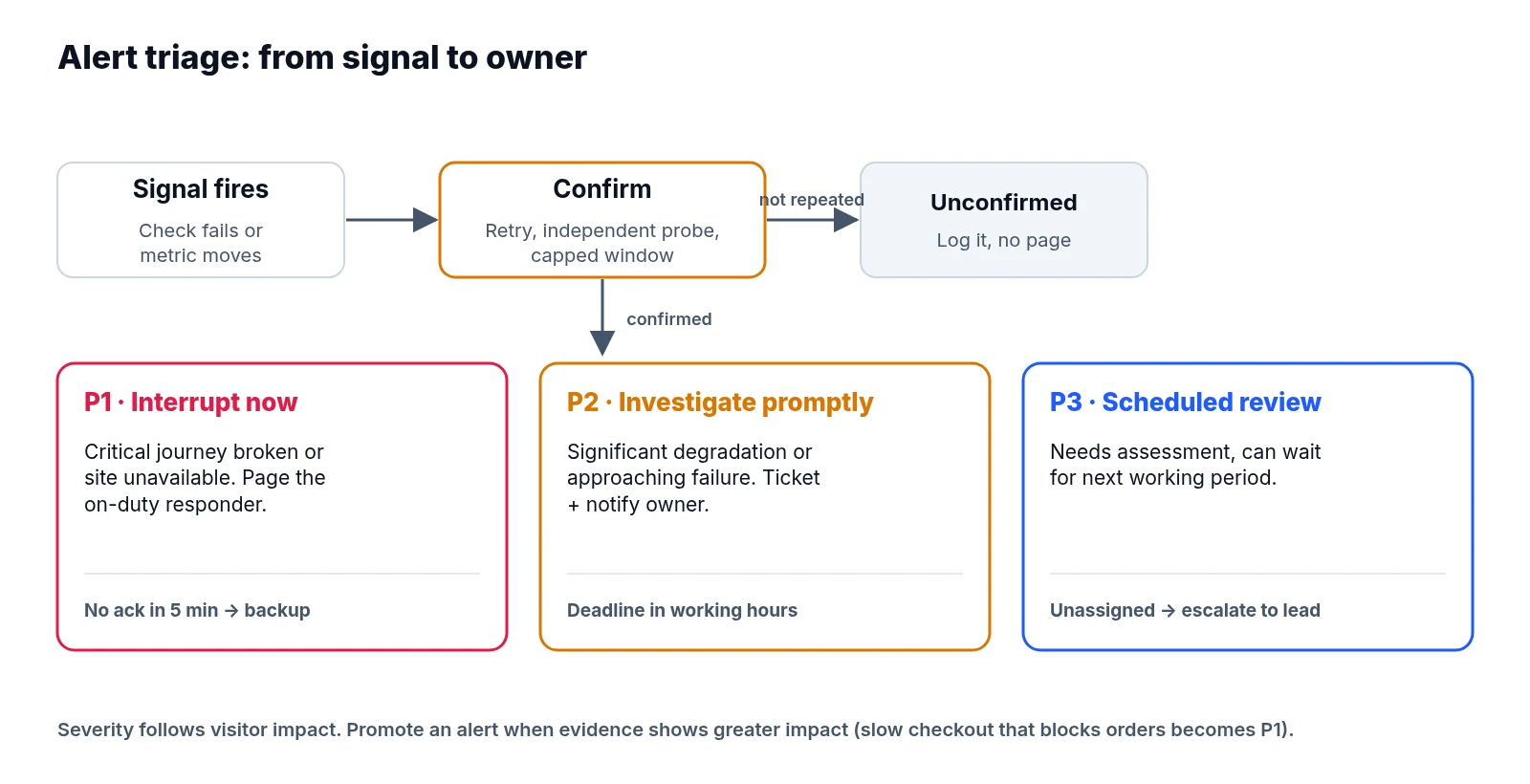
- P1: Interrupt now. Visitors cannot complete a critical journey, or a material part of the site is unavailable. Notify the person on duty through a channel that can wake them.
- P2: Investigate promptly. There is significant degradation or an approaching failure, but no confirmed critical outage. Create a ticket and notify the responsible owner.
- P3: Review in a scheduled queue. The change needs assessment, yet it can wait for the next working period.
Structuring tiers this way follows the principle of alerting on service symptoms and keeping interruptions actionable, described in Google’s monitoring guidance.
Agree on coverage before enabling P1 alerts. An unattended shared inbox cannot provide an overnight response.
The Policy Comes Before the Rule Configuration
Teams often jump into threshold settings before deciding who owns the outcome. Writing the policy first forces those operational choices into the open. The table below is an illustrative starting policy rather than a universal set of thresholds; adjust it to traffic, commercial importance, monitoring frequency, and contracted support hours.
Every role below must resolve to a named person or current rota entry, with a backup. Escalation deadlines start when the confirmation rule is met. P1 deadlines use elapsed time, while P2 and P3 deadlines use agreed working hours.
| Signal | Severity | Confirmation required | Primary owner | Escalation deadline |
|---|---|---|---|---|
| Critical site unavailable | P1 | Repeat failed request within 60 seconds; check an independent location or user path | Infrastructure responder | No acknowledgement in 5 minutes: contact backup |
| Checkout or lead submission fails | P1 | Repeat a controlled transaction and verify the expected result is missing | Application responder | No acknowledgement in 5 minutes: contact engineering lead |
| Critical pages persistently slow | P2 | Breach the agreed response-time limit for 10 minutes across repeated checks | Performance owner | No acknowledgement in 1 working hour: contact technical lead |
| TLS certificate nearing expiry | P2 | Verify the served certificate has 14 days remaining and renewal is not confirmed | Infrastructure owner | No renewal plan in 1 working day: contact service owner |
| Important pages unexpectedly noindexed | P2 | Re-fetch affected URLs and confirm the directive is unintended | Technical SEO owner | No acknowledgement in 2 working hours: contact development lead |
| Traffic or conversion anomaly | P2 | Check data freshness, comparable periods and collection health | Analytics owner | No acknowledgement in 4 working hours: contact marketing lead |
| Ranking cluster drops | P3 | Confirm comparable device and location settings across two scheduled checks | SEO owner | Unassigned after 1 working day: contact SEO lead |
| Valuable backlink disappears | P3 | Recheck the source page and destination; distinguish removal from fetch failure | Outreach owner | Unassigned after 2 working days: contact account lead |
Promote an alert when evidence shows greater impact. Slow pages start as P2, but they become P1 if customers cannot complete checkout. Likewise, an expired certificate preventing access belongs under availability rather than a routine renewal ticket.
Be explicit about what acknowledgement means. Accepting an alert means someone takes responsibility for the investigation, which is distinct from resolving the problem. Require the owner to record the next action and update time so an acknowledged incident cannot disappear.
Confirmation Delays vs. Detection Speed
Confirmation rules cut down on transient noise, though every extra check adds detection delay. Choose that delay deliberately.
For availability checks, combine short retries with an independent probe where possible, and cap the confirmation window—two minutes is a practical limit for critical journeys. If the second probe is unavailable, route the repeated failure as unverified rather than waiting indefinitely. Avoid requiring every region to fail, since a regional outage can affect real customers while other probes stay healthy.
For analytics, account for reporting delays, low volumes, and weekday patterns. Zero conversions overnight on a small site is weak evidence; a reproducible form failure is much stronger. Never make an operational outage wait for analytics confirmation.
Separate failure and recovery rules as well. Opening a latency incident after ten minutes above the agreed limit and requiring five healthy minutes before closing it reduces repeated opening and closing around a threshold. Recovery checks should verify the affected journey rather than only checking the homepage.
Keep failed observations in your logs even when they do not trigger notifications. They are essential when checking whether confirmation rules hid a real problem.
What a Responder Needs in the First Message
When an alert fires, the message itself should carry enough context to start work immediately.
A useful notification names the affected site, environment, and customer journey, alongside the observed failure, first-seen time, and confirmation evidence. It also states the severity, owner, and acknowledgement deadline, followed by a link to the incident, relevant diagnostics, response instructions, and the first safe investigation step.
Compare two alerts. “Checkout failed twice; test order was not created; application responder to acknowledge within five minutes” gives someone a clear starting point. “Website health changed” forces them to reconstruct the problem.
Route client communication through an assigned account contact. Technical responders need diagnostic detail, whereas clients need confirmed impact, current action, and the next update time.
One Failure, Eight Sites: Grouping Without Losing Detail
Grouping combines related signals into one incident, while deduplication prevents repeated delivery of the same signal. Both help manage volume, provided neither erases the underlying evidence.
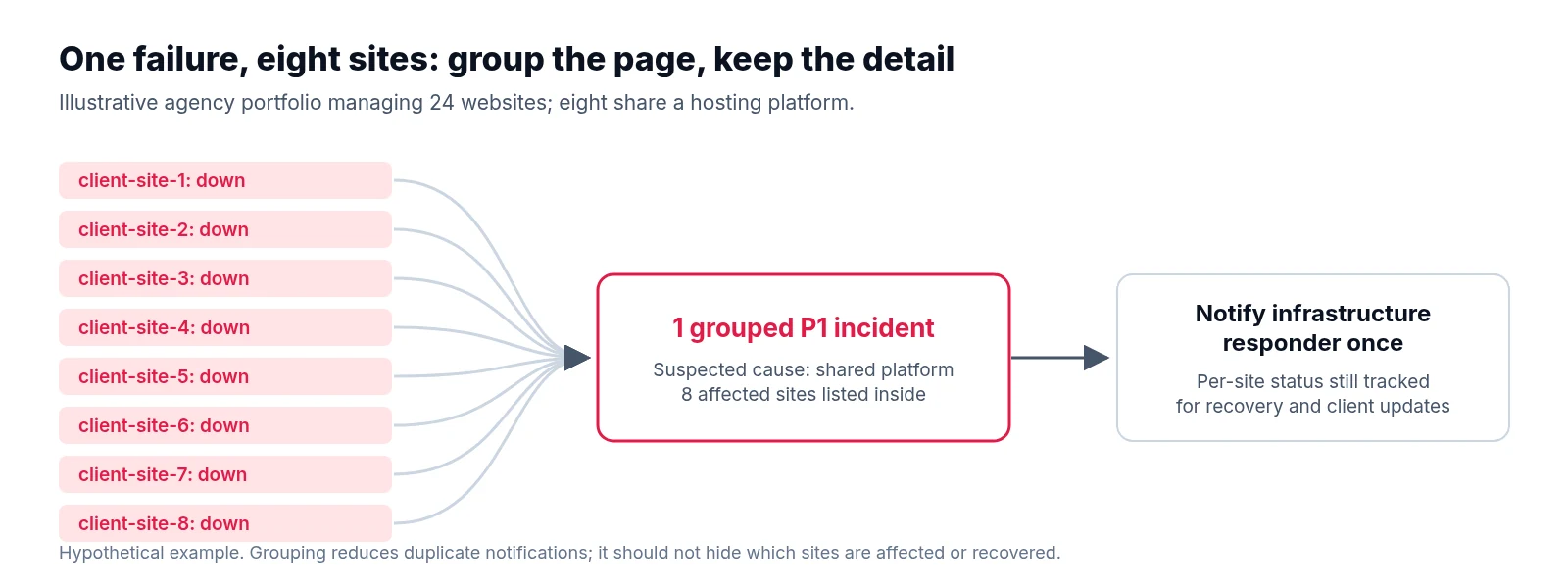
Consider an illustrative agency managing 24 websites, where eight share a hosting platform. When that platform fails, availability checks fire across those eight sites, followed by page errors and failed form tests.
Create one parent incident for the suspected platform failure with the eight affected sites attached, and notify the infrastructure responder once. Inside the incident, preserve each site’s first failure time, affected journeys, and recovery status. As evidence confirms the shared cause, attach dependent alerts without sending a fresh interruption for each one. Notify again only when impact expands, severity increases, or the acknowledgement deadline expires.
Unrelated problems must stay separate. A checkout failure on a ninth site using another platform belongs in its own incident, because a shared timestamp alone is insufficient evidence of a shared incident.
Use site, environment, dependency, and failure type as grouping inputs. Keep grouping delays short enough to preserve the response target, and never hold the first critical alert while waiting for more failures.
Auditing Noise Against Missed Outages
Review the policy weekly at first, and again after significant releases or incidents. Examine incident records alongside raw checks, support reports, deployment logs, and customer complaints.
During review, classify what happened into four distinct buckets: an actionable incident where intervention was justified, a false positive where investigation showed the reported impact was absent, a duplicate where another notification repeated an incident already being handled, or a missed or late incident where evidence showed impact before a useful notification reached its owner.
Keep these categories distinct. A genuine outage that recovered quickly is still a real incident rather than a false positive, and an escalation reminder is not automatically a duplicate.
Track false positives as a share of reviewed incidents, unnecessary notifications per incident, acknowledgement times, and known missed incidents. Record the evidence source for misses, as having no recorded misses does not prove complete detection.
In the illustrative portfolio, grouping might reduce eight initial pages to one without changing coverage. Extending confirmation from two minutes to fifteen could also reduce notifications, yet it would conceal short customer-facing outages. Compare both changes against the same incident history before adopting either.
Replay proposed rules against retained observations where possible. Trial changes on a limited set of sites, retain critical checks, and watch for slower detection. Reverse a change if it hides material failures. A quieter inbox is useful only when incident response remains dependable.
Where Automated Alerts Meet Daily Checks
Use the daily website health check to inspect gaps that automated rules may miss. Give each rule a review date and revisit ownership whenever contracts, staffing, or infrastructure change.
LiveSolN’s Reporting & Alerts can bring analytics, crawl, ranking, and backlink signals into that workflow. Apply the policy through the monitoring and incident tools you use, checking which confirmation and routing controls each supports.
Every notification should answer four questions: what needs attention, how certain are we, who owns it, and when does someone else take over? If a rule cannot answer all four, improve it before asking the team to trust it.
Written by
LiveSolN Team
SEOs and analysts with more than a decade in the industry, writing about the monitoring and reporting problems we built LiveSolN to solve.

