Out-of-Stock Product Pages and SEO: Keep, Redirect or Remove?
Decide when out-of-stock product pages should stay live, redirect or return an error, then use crawl data to catch costly catalogue lifecycle mistakes.

A popular item sells out on a Tuesday afternoon. The warehouse team already has another delivery booked, yet the website reacts as if the product never existed. Within hours, an automated job removes the page, breaks its internal links across category grids, and drops the entry from the XML sitemap. Three weeks later, when stock returns to the shelves, someone creates a brand-new URL from scratch.
A blunt catalogue rule has just turned a routine restock into an avoidable SEO problem.
Out-of-stock product pages need different treatment depending on whether the product will return, whether a suitable replacement exists, and whether the original page still helps visitors. Define those decisions in your merchandising workflow first, then use crawl data to check that the website actually follows them.
Separate zero inventory from the product's actual lifecycle
Before changing a URL or altering its status code, establish its actual lifecycle state. Zero inventory in a warehouse feed alone does not tell you whether a product is temporarily unavailable or permanently discontinued.
Every unavailable item on your storefront can be routed through four practical questions. First, will the same product return? If so, keep the page live. Second, if it will not return, is there a genuine replacement serving the same need? When a true successor exists, consider a permanent redirect. Third, if there is no suitable replacement, does the original page still provide useful information for owners or researchers? In that case, keep a clearly labelled archive page. Finally, if neither a replacement nor useful content exists and the page has reached the end of its purpose, remove it with a proper error response.
| Product state | Expected response | Internal links | XML sitemap |
|---|---|---|---|
| Temporarily unavailable | 200 | Retain relevant links | Keep canonical URL |
| Permanently replaced | 301 to replacement | Update to destination | Remove old URL; include destination |
| Discontinued but useful | 200 archive page | Retain useful contextual links | Keep if intended for indexing |
| Removed without replacement | 404 or 410 | Remove or replace links | Remove URL |
The hardest cases are the undecided ones where buyers are waiting on supplier confirmation. Assign someone to resolve uncertain stock states directly, and give those products a firm review date instead of letting an automated rule treat uncertainty as permanent removal.
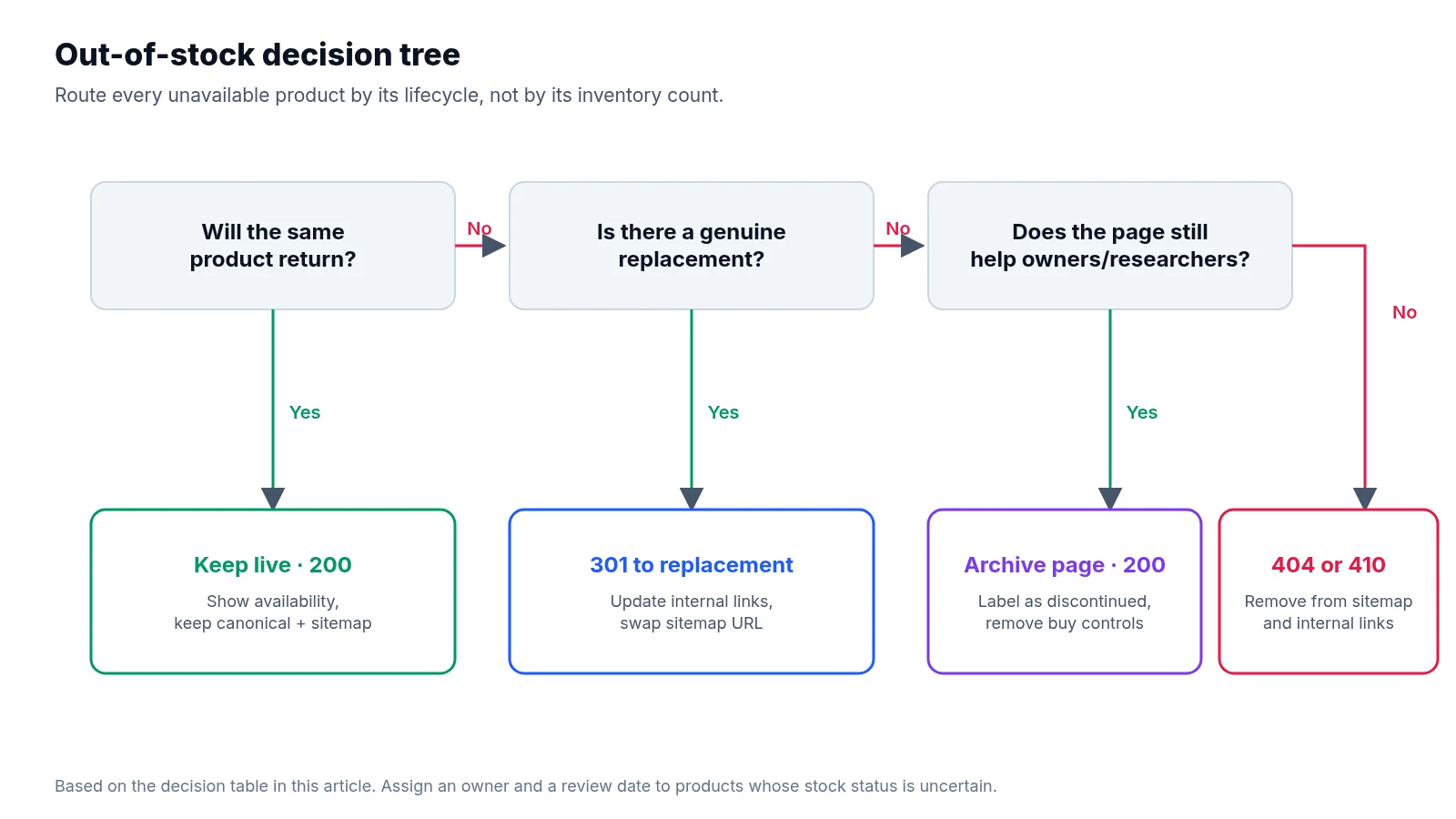
What to do during a temporary stockout
For a product expected to return, preserve its existing URL and return a 200 status code. Keep its description, specifications, images, and other useful content intact on the page. Explain the shortage prominently near the price, disable unavailable purchasing options so shoppers cannot add missing items to their basket, and offer a stock notification where practical.
Be careful with restock timelines. Only publish a return date when you have a reliable one from your supply chain. You can suggest available alternatives on the page to help shoppers who need something immediately, provided you do not force visitors away from the product they specifically searched for.
Throughout the shortage, keep the page crawlable and indexable, normally with a self-referencing canonical tag. Do not let your platform automatically add a noindex directive, change the canonical tag to a parent category, or introduce a temporary redirect whenever inventory reaches zero. Flipping indexability signals off and on every time stock fluctuates forces search engines to re-evaluate the URL from scratch. Retain relevant internal links too, even if your merchandising rules push unavailable items lower in category listings, and keep the canonical URL in the XML sitemap while you want it indexed.
Your structured data also needs to match the visible availability on the page. Google's merchant listing documentation supports OutOfStock and BackOrder, among other values. Choose the state that accurately describes the current offer, and keep any shopping feed consistent with the actual purchasing options on site. Pay close attention to multi-variant templates as well: if only one size or colour is unavailable, handle that specific variant accurately rather than retiring the whole product family.
Redirecting permanently replaced products
A permanent redirect makes sense when a discontinued product has a clear successor or equivalent that satisfies the original visitor's need.
Before setting the rule, check purpose, compatibility, specifications, and price range. Simply being in the same category is not enough. A different accessory that cannot physically fit the original device is a poor replacement, however convenient the redirect would be for the team cleaning up old URLs. For an illustrative example, a retired desk lamp with a directly equivalent successor model may justify a 301 redirect. Sending every retired lighting product to the main lighting category page does not establish the same relationship and leaves searchers hunting through a generic grid.
When a true match holds, use a server-side 301 directly to the final destination without chaining hops. Google's redirect guidance identifies permanent redirects as a strong signal that the destination should become canonical. Even with a clean 301 in place, update your internal links to point straight to the replacement rather than relying on the redirect forever. Remove the old URL from the XML sitemap and include the replacement URL if it is canonical and indexable.
Finally, check that the destination page returns 200, remains available to buy, and explains any meaningful differences from the older version. Remember that redirects are a signal rather than a promise; even a well-matched 301 cannot guarantee retained rankings.
When a discontinued product deserves an archive page
Some discontinued pages still answer valuable questions long after sales end. Existing owners and second-hand buyers may need exact dimensions, downloadable manuals, compatibility information, or replacement-part details.
When a page holds that kind of reference value, a substantial archive page can continue to return 200 and remain indexable. Clearly state near the top of the page that the product is discontinued, remove misleading purchase controls, and retain the technical information visitors actually need. You can also link to a newer successor or compatible alternatives when helpful.
An archive page does not need prominent placement among available products in your main commercial grids, but it should never become an orphan. Keep contextual links pointing to it from support resources, buying guides, or a dedicated archive section. Include the URL in the XML sitemap if you want it indexed, and review its purpose periodically. A bare template showing only a product title, a single image, and an unavailable message is a weak reason to preserve a page indefinitely.
Removing dead products cleanly with 404 or 410
If a product is permanently gone and the page offers no continuing value to visitors, return a 404 or 410 status code.
In HTTP specifications, 404 means the resource was not found, whereas 410 explicitly indicates that it is gone permanently. Google documents in its HTTP status guidance that both status codes lead to removal from its index, so do not build your technical policy around promises that one guarantees faster removal than the other.
Serve a helpful error page with clear site navigation and relevant suggestions while preserving the actual HTTP error response from the server. A template saying “product not found” while returning a 200 status code is a common mistake that search engines routinely treat as a soft 404. At the same time, remove the dead URL from your sitemaps and update or strip internal links pointing to it, while keeping the URL accessible to crawlers so they can see the error response and drop the page cleanly.
Before removing a batch of retired products, check their backlinks and organic landing-page traffic. Strong external links or steady search visits identify pages needing closer human review, though they still do not make an unrelated redirect appropriate.
Auditing your catalogue rules with a targeted crawl
A web crawl can report the HTTP response it receives on a given day, but it cannot know on its own whether an out-of-stock product should return next month. Real verification requires joining technical crawl observations to your underlying catalogue decisions.
Start by building an expected URL list from your merchandising data. Export product URLs alongside their lifecycle state, expected HTTP response, replacement destination where applicable, and scheduled review date—using a stable product identifier to connect inventory records with live URLs. Make sure the export includes recently changed products as well as examples from every lifecycle branch. Then add important URLs pulled from analytics, backlink records, and previous crawls so that deleted or newly orphaned products remain in scope. This combined dataset becomes your expected behaviour list, with your previous crawl serving as a baseline.
Next, check both the target URLs and their internal link sources. Fetch the expected URLs directly in list mode, then crawl the categories, buying guides, and support sections that link to them. A standard crawl starting only at the homepage can easily miss the very products that have just lost all their internal links. Use section limits and a sensible request rate so you do not strain the storefront. For each URL, record its HTTP status, redirect destination, and number of hops, along with any robots restrictions, noindex directives, and canonical destinations. Track XML sitemap membership and internal link sources, and capture visible product content, availability text, and structured data where your crawler supports custom extraction. For JavaScript-dependent templates, always inspect the rendered output as well as the initial server response; a browser displaying an unavailable message on screen does not prove the server returned the intended status code.
Once the crawl completes, compare actual behaviour on the site with your catalogue rules and filter for mismatches that reveal broken logic. Watch for temporary shortages returning 404s, redirecting away, or carrying noindex tags. Flag retired URLs that redirect to unrelated pages, loop through multi-hop chains, or point at unavailable replacements. Check for redirected or removed URLs still appearing in sitemaps, category links still pointing to removed products or old redirecting URLs, useful archive pages losing their body content or all contextual internal links, and visible availability messages disagreeing with structured data. Because a 200 response alone does not prove a page is useful or indexed, inspect suspicious templates directly and use Search Console's Page indexing report and URL Inspection tool for Google's view. Our broader technical SEO audit checklist helps place these catalogue checks within recurring site maintenance.
Fix the underlying logic and confirm recovery
When your audit uncovers errors, group mismatches by their systemic cause rather than patching URLs manually. A stock integration that deletes temporarily unavailable products needs a lifecycle rule fix in the backend, whereas hundreds of stale category links pointing to dead URLs may need a template adjustment or a cache correction.
Write each development ticket with concrete example URLs, the recorded catalogue state, the expected behaviour under your policy, and the observed behaviour from the crawl. Prioritise accidental removal of returning products, misleading redirects, and faults affecting valuable organic landing pages.
After deployment, recrawl both the affected URLs and their internal link sources to confirm the fix held. Check those same URLs again when temporarily unavailable products return to stock: purchase controls, availability markup, and category placement should all recover cleanly on the existing URL.
LiveSolN's Site Crawler can help compare crawls over time and surface changes in status codes, redirects, indexability, and sitemap consistency. Pair those technical findings with your catalogue export to distinguish deliberate product retirements from costly automation mistakes. Keep returning products live, useful, and indexable on their existing URLs; redirect permanently only when a replacement truly satisfies the original need; preserve discontinued pages as archives when their reference information still serves visitors; reserve 404 or 410 responses for genuinely retired pages without a useful replacement; and verify your lifecycle rules against catalogue data, internal links, and sitemaps after every release.
Written by
LiveSolN Team
SEOs and analysts with more than a decade in the industry, writing about the monitoring and reporting problems we built LiveSolN to solve.

