SEO Migration Redirect Mapping: Build and Validate Your URL Map
Build and validate an SEO migration redirect map with crawl exports, URL matching and destination checks to protect valuable landing pages during launch.

A migration redirect can pass every technical check on your launch list and still lose the visitor. The server returns a permanent redirect, the target URL loads cleanly, and the status cell in your spreadsheet turns green. Yet someone looking for a specific service lands on a general category page that never answers their question.
Redirect mapping requires two distinct kinds of validation: checking whether the destination page makes sense for the visitor, and confirming that the deployed redirect reaches it cleanly in production.
A well-structured redirect workbook lets you test both before launch and verify live server behaviour once the switch flips.
Pulling Together the Legacy URL Inventory
Start by crawling the existing website. Export each URL with its status code, canonical URL, indexability, title, heading, and internal link count. Save the crawl date and crawler configuration alongside the export so anyone reviewing the file later knows what the crawl covered.
A site crawl only discovers pages it can reach through current internal links. Pull additional URLs from XML sitemaps, the CMS, Search Console landing-page exports, analytics, backlink reports, and available server logs. Those sources routinely surface orphan pages, older campaign landing pages, and linked file downloads that site navigation no longer exposes.
Include existing redirects too. If an older address already redirects to a page that is moving again, update that original redirect so it reaches the final destination directly instead of creating a chain.
Keep a master inventory tab with one row per distinct source URL, preserving the original address character for character. Create a separate matching key for comparisons rather than overwriting paths or stripping parameters from the source column.
Never assume that path case, trailing slashes, or query parameters are interchangeable. A parameter might identify a specific product, language version, or pagination page. Document which URL variants genuinely represent the same content before consolidating them.
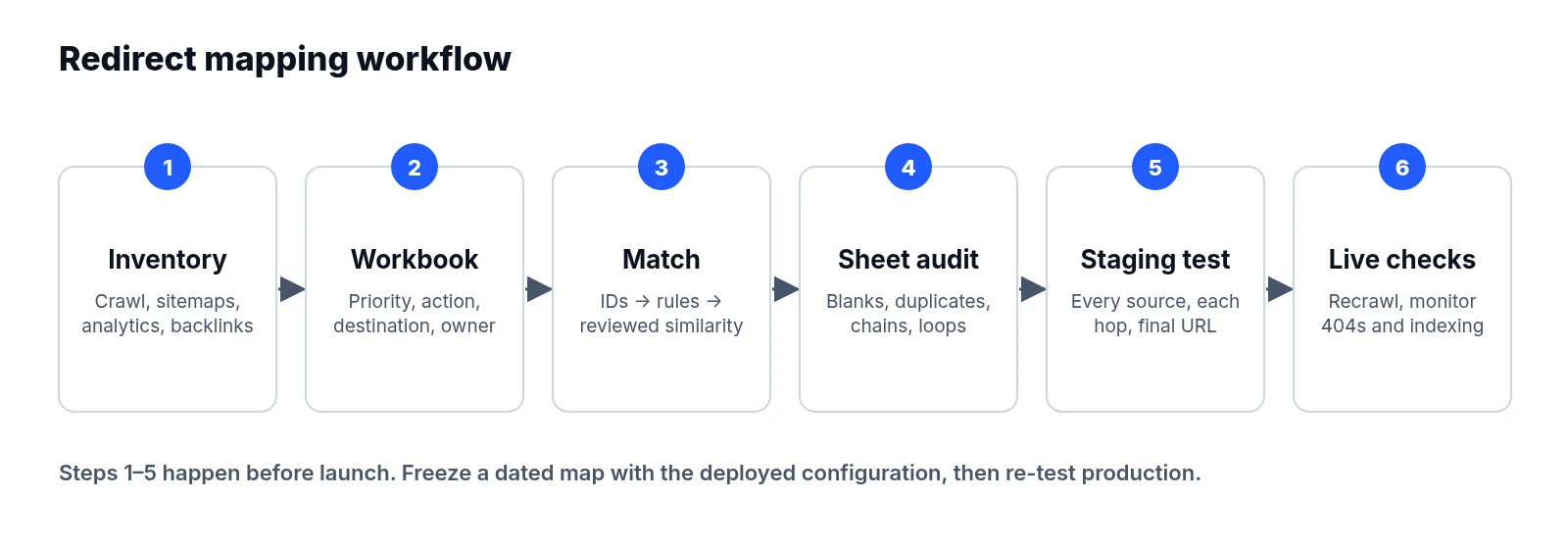
Structuring a Redirect Workbook That Survives Edits
Use separate tabs for source data, the working map, and validation results. Keeping those layers apart stops fresh data exports from overwriting mapping decisions that have already been reviewed.
Build the working map around these fields:
| Field | Purpose |
|---|---|
| Source URL | Exact existing address to test |
| Current status and canonical | Existing behaviour and preferred URL |
| Organic clicks and sessions | Search and traffic importance |
| Conversions or revenue | Commercial importance, where available |
| Referring domains | External link importance |
| Priority | Order for review and fixes |
| Action | Keep, redirect, retire or review |
| Destination URL | Intended final production address |
| Match method and reason | Evidence supporting the choice |
| Owner and approval | Person responsible for the decision |
| Test result and date | Latest observed behaviour |
Pull metrics from consistent reporting periods and label those date windows clearly. Search Console clicks and analytics sessions measure different things, so retain both in separate columns without adding them together.
Prioritise pages with conversions, meaningful organic traffic, valuable backlinks, or direct business importance. Watch for seasonality as well: an annual landing page may deserve close attention even when recent traffic looks low. Leave missing data marked as unknown rather than letting formulas turn blanks into zero.
Every source URL needs an explicit action. An unchanged URL can stay live without a redirect under Keep, while a removed page with no relevant replacement can return 404 or 410 under Retire. Neither should sit as an unexplained blank cell.
Matching Destinations by Content and Search Intent
Crawl or export the new site to create a destination inventory covering planned production URLs, titles, headings, content identifiers, language, and indexability checks.
Match stable identifiers first. A retained CMS content ID or product SKU provides stronger evidence than a similar URL slug. Next, apply confirmed structural rules, such as moving an unchanged article from one directory to another.
Use title, heading, and text similarity to suggest the remaining matches, but treat those suggestions strictly as review candidates. Similar wording does not prove that two pages serve the same purpose.
For each important mapping, ask whether the destination satisfies the reason someone visited the old page by checking the topic, depth of detail, language, and next action.
This example shows how the action differs by page:
| Old path | Action | Destination or reason |
|---|---|---|
/services/office-cleaning | Redirect | /commercial-cleaning/offices, equivalent service |
/guides/cleaning-checklist | Redirect | /resources/office-cleaning-checklist, updated guide |
/offers/spring-2022 | Retire | Offer ended; no equivalent replacement |
/contact | Keep | Address and purpose unchanged |
Several old pages can legitimately map to one consolidated page when it covers their content and intent. Review those consolidated groups together. By contrast, a long list of URLs pointing to the homepage or a broad category page deserves investigation.
Google warns in its site migration guidance that irrelevant redirects can be treated as soft 404s. A successful HTTP response does not establish relevance.
Pre-Launch Validation: Spreadsheet Audits and Staging Tests
Start with formula checks in the spreadsheet, then test the actual redirect configuration in a controlled environment.
Filter the sheet for missing actions, missing destinations on redirect rows, duplicate sources with conflicting targets, and destinations absent from the new URL inventory. Run an exact lookup against the full master inventory to expose any source URLs omitted from the working map.
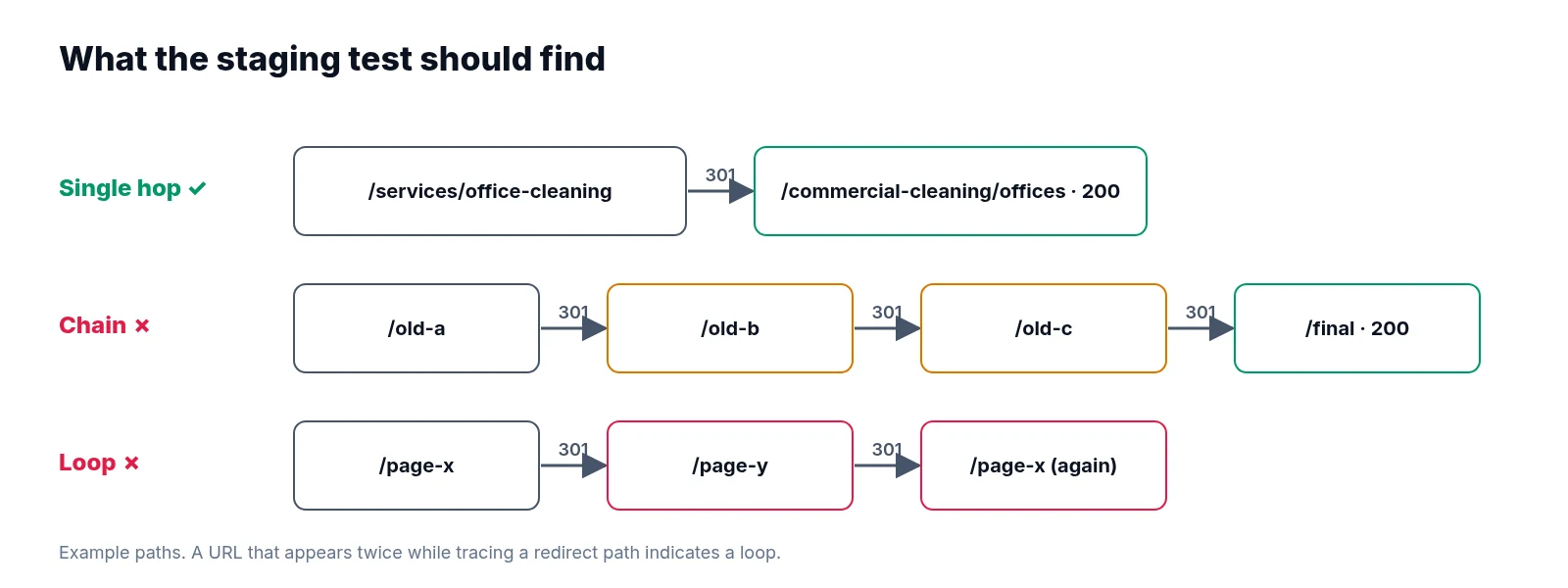
Flag sources that equal their own destinations, along with destinations that appear elsewhere as redirect sources. Those overlaps indicate possible chains or loops. Trace each proposed path until it reaches a final page; revisiting a URL identifies a loop.
Spreadsheet checks catch obvious mistakes in the map, but they cannot prove that server rules behave correctly.
Testing the Redirect Rules
Load the proposed rules into a test environment that reproduces production routing. Request every redirect source in list mode and record the initial response, each redirect hop, and the final URL.
For permanent page moves, use server-side 301 or 308 redirects. Both status codes indicate a permanent move, as explained in Google's redirect documentation.
Aim for a single hop to the intended destination. Test hostname, HTTP/HTTPS, trailing-slash, and meaningful parameter variants explicitly. Check rule precedence as well: a broad directory rule can intercept an individual mapping before it runs. Browser spot checks help with visual content review, but they can hide intermediate redirects and cached behaviour.
Checking Destination Eligibility
Every destination intended for organic search needs to be eligible for indexing once reached. Verify that each target returns a 200 status code and contains the expected content, that production robots.txt permits crawling, and that neither HTML robots directives nor the X-Robots-Tag header specifies noindex. Confirm that its canonical tag points to the intended final URL, and verify that the page does not require authentication or display an error, empty template, or soft 404.
Technical eligibility still does not guarantee indexing. Review rendered content where JavaScript affects what visitors and crawlers receive.
Keep staging protected during testing. Record which authentication barriers, robots rules, and noindex directives are staging safeguards, then verify their production equivalents at launch. Never expose staging merely to make pre-launch checks pass.
Before release, resolve critical exceptions, assign owners to remaining issues, and freeze a dated map alongside the deployed configuration.
Checking Live Production After Launch
The approved spreadsheet records intent. Production requests provide evidence.
Immediately after launch, request the complete source list again through the public website. Capture the first status, redirect path, final URL, and destination checks, then compare observed results with each row's expected action.
Unchanged pages should remain available. Redirect rows should reach their approved destination, and retired pages should return their planned error status. Investigate any unexpected result—including a redirect that reaches a different but valid page.
Check high-priority URLs first, then complete the full list. Production CDN rules, cached responses, hostname settings, and routing often behave differently from staging.
Crawl the new site separately to find internal links still pointing through redirects, broken navigation, and canonical conflicts. Update internal links and XML sitemaps to use final URLs. Our technical SEO audit checklist covers a broader set of follow-up checks.
Keeping the Map Useful Over Time
Repeat validation after routing fixes and during the early monitoring period. Review server logs and Search Console for old addresses missing from the inventory, adding newly discovered URLs to the same map so decisions remain traceable.
Compare organic landing-page performance across each old/new URL pair. Confirm analytics works before interpreting a traffic drop, and investigate technical failures alongside ranking changes.
Keep redirects running long enough for users and search engines to revisit old addresses. Google recommends at least a year; retain useful redirects longer, particularly where external links still send visitors.
LiveSolN's Site Crawler can support ongoing checks for redirect chains, broken links, and indexability changes alongside Rank Tracking and analytics reporting. Keep the approved map as the reference for deciding whether observed behaviour is correct. Combining crawl exports with traffic, link, and CMS data, giving every source an explicit reviewed action, validating destination relevance separately from technical behaviour, testing the full map before and after launch, and keeping owners, exceptions, and verification dates attached to the file turns a launch spreadsheet into a reliable long-term audit record.
Written by
LiveSolN Team
SEOs and analysts with more than a decade in the industry, writing about the monitoring and reporting problems we built LiveSolN to solve.

