Salesforce vs HubSpot for Marketing Reporting and Attribution
Compare Salesforce and HubSpot attribution, GA4 and Search Console data, dashboards and closed-loop reporting to connect SEO and website performance to revenue.

A buyer finds your company through an organic search result, reads a comparison page, registers for a webinar a few weeks later, and eventually signs a contract. When leadership asks which channel earned that revenue, Salesforce and HubSpot can give you two completely different answers from the exact same sale.
For marketing operations teams, SEO leads, and agencies, the practical difference between the two platforms comes down to how reliably each one connects anonymous website visits to named contacts, active sales opportunities, and closed revenue. HubSpot shortens that path when marketing and sales teams work inside the same portal every day. Salesforce gives you much wider latitude to mould reporting around a complex, multi-stage sales process, though your team takes on far more implementation and maintenance decisions along the way.
If you are weighing the broader CRM decision across sales, service, and operations, this HubSpot vs Salesforce guide walks through the full platform comparison. Here, our focus stays squarely on the reporting you will have to defend when finance or leadership asks what organic traffic contributed to revenue.
Audit the exact subscription on your quote
Buying a CRM license does not mean you have bought a working attribution setup. A standalone Salesforce Sales Cloud deployment behaves very differently from one paired with Account Engagement and an external business intelligence platform. On the HubSpot side, a standard CRM account does not automatically include advanced marketing attribution.
HubSpot splits its attribution tools into three distinct report types: Contact Create, Deal Create, and Deal Revenue Attribution. According to HubSpot's current documentation, both deal creation attribution and deal revenue attribution require a Marketing Hub Enterprise subscription. Always verify the specific report types your stakeholders expect against the tier on your contract proposal, because having access to standard sales pipeline dashboards tells you nothing about whether your account can run multi-touch revenue attribution. You can review the exact tier requirements in HubSpot's attribution report documentation.
Before you evaluate either platform, write down a concrete reporting scenario and hand it to the implementation team. Ask them to show you two numbers from the same dataset: first, the total closed-won deal value associated with contacts who were first acquired through organic search; second, the share of revenue allocated to organic search touchpoints across the full buyer journey under a multi-touch model. Those two views answer very different commercial questions. Have your team demonstrate both using traceable individual records rather than summary slides.
Where campaign records and deals actually connect
Both systems fail in predictable ways when the bridge between marketing activity and sales pipeline breaks, and each CRM builds that bridge out of different objects.
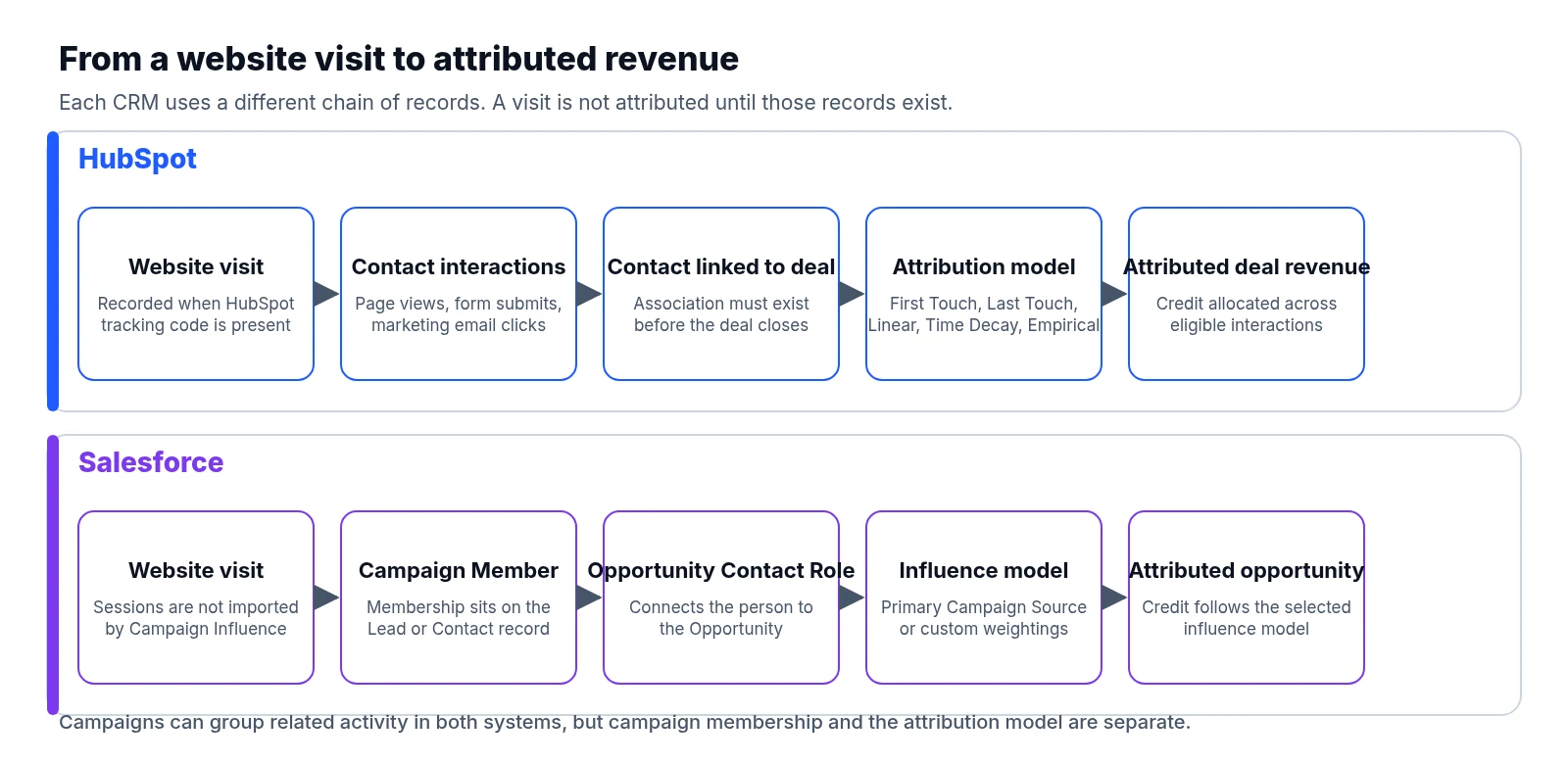
Salesforce links Campaign Members to Opportunities through opportunity contact roles. If a sales representative opens an opportunity and forgets to attach the buying committee as contact roles, any marketing engagement sitting on those Lead or Contact records remains invisible to standard campaign influence reports. Even when a single primary campaign is attached to the deal, Salesforce's default Primary Campaign Source model assigns 100 percent of the credit to that one selected campaign. Whether that field reflects the prospect's original search visit, the last form submission before a demo, or whatever a rep manually typed in depends entirely on the population rules your administrators enforce. Salesforce's Customizable Campaign Influence documentation breaks down how these object relationships work.
HubSpot takes a different route by logging granular interactions—such as tracked page views, form submissions, and marketing email clicks—directly on contact records, then relying on contact-to-deal associations to calculate attribution. For external websites hosted outside HubSpot, those page views only register if the HubSpot tracking code is installed and firing properly. Inside HubSpot, campaigns group related marketing assets together, while attribution models operate separately to distribute credit across recorded contact interactions. HubSpot's attribution definitions list which interaction types qualify for credit.
Whichever CRM you run, SEO reporting depends on keeping a prospect's original landing page and first acquisition source locked in dedicated fields while logging subsequent conversions separately. When a system lets a later email click or paid retargeting visit overwrite the original source field, the evidence of how organic search started the relationship disappears.
Comparing the attribution models
Open HubSpot's current report builder and you will find five attribution models listed: First Touch, Last Touch, Linear, Time Decay, and Empirical. First Touch and Last Touch put all the credit on a single boundary interaction at the start or end of the tracked path. Linear splits credit equally across every eligible interaction, while Time Decay weights recent interactions more heavily than earlier ones. The Empirical model calculates weights for different interaction types based on how frequently they appear across conversion paths in your account.
Watch out for outdated advice when configuring HubSpot reports. HubSpot's current report creation guide notes that the Empirical model replaces the older U-shaped, W-shaped, J-shaped, and inverse J-shaped models. Plenty of third-party tutorials and agency templates still reference those older position-based models, so check what is actually available in your live report builder before promising a specific model to executives.
In Salesforce, Customizable Campaign Influence supports the default Primary Campaign Source model alongside custom models that let you define your own weightings. Eligible Sales Cloud and Account Engagement configurations can also enable additional first-touch, last-touch, and even-distribution models. Keep in mind that creating a custom model container in Salesforce does not populate the underlying touchpoints on its own. Custom weighting rules often demand ongoing manual administration or custom automation through flows, code, or APIs to assign percentages and keep campaign member records aligned with open opportunities.
When presenting numbers to leadership in either system, pair a discovery-focused model with a model that distributes credit across the journey. Take a straightforward scenario where an organic search visit brings a prospect to your site in January and a product webinar precedes the signed contract in May. Switching between First Touch and Time Decay shifts revenue credit from SEO to the webinar on your dashboard without changing the actual contract value by a cent. Attribution rules divide up observed revenue across recorded interactions; they never prove on their own which activity caused an incremental sale.
Fitting GA4 and Search Console into CRM reporting
Connecting search and web analytics tools to your CRM helps contextualize traffic trends, provided you respect the boundaries of what each dataset actually measures.
HubSpot offers a direct Google Search Console integration that pulls clicks, impressions, click-through rate, and average position into its built-in SEO tools for accounts with eligible Marketing Hub or Content Hub subscriptions. Reviewing search visibility alongside page performance in one interface is convenient, and HubSpot's SEO analytics guidance covers how to set it up. Even with that integration active, Search Console cannot tell you which individual search query produced a specific named buyer in your CRM, because Search Console reports aggregated search performance rather than a person-level identity feed.
You can also drop a GA4 measurement ID into HubSpot-hosted pages to deploy Google Analytics tracking, as explained in HubSpot's GA4 integration instructions. Running both tracking scripts on the same domain still leaves GA4 events and HubSpot interactions as separate datasets with their own session rules, cookie lifespans, and source attribution logic. Expect their session counts and channel totals to differ even when both tags fire on every page.
In a Salesforce environment, you have to decide early on how GA4 and Search Console metrics will reach your reporting layer, whether through a third-party connector, an automated export pipeline, or a data warehouse feeding a business intelligence dashboard. Turning on Campaign Influence inside Salesforce does nothing to import website sessions or organic search impressions. Ask your implementation team to document the exact data flow, refresh schedule, and matching keys before any dashboard work begins.
Before comparing numbers across platforms in either CRM, standardize your tracked domains, landing page URL formatting, date ranges, time zones, and channel definitions. Our guide to Search Console clicks versus GA4 sessions breaks down why clicks and sessions naturally diverge even on a healthy site. Keep query-level and page-level search metrics aggregated, and only join CRM revenue outcomes where you have a legitimate, verified identity link such as a form submission.
Clear definitions come before new dashboard charts
Teams often rush to build executive dashboards before agreeing on how the underlying objects join together.
HubSpot's custom report builder lets you combine supported CRM, marketing, and sales data sources within the limits of your subscription tier and user permissions. That workflow feels fast and approachable when the required properties and object associations already exist inside HubSpot, though you should not treat the builder as an unrestricted SQL join across every connected application's raw event tables. See HubSpot's custom report guide for details on supported data sources.
Salesforce reporting exposes campaign influence alongside opportunity records, with standard and custom report types governing which object relationships you can pull into a single view. Salesforce's influence reporting guidance explains when an administrator needs to configure a custom report type. This structure suits organizations willing to maintain a disciplined CRM data model while keeping top-of-funnel web analytics in a separate reporting layer.
Regardless of which platform renders the charts, a reliable executive view should trace a logical chain from technical site health to revenue. Start by checking whether website availability, crawlability, or tracking scripts changed during the period, then look at whether organic visibility and relevant landing-page traffic shifted in response. From there, track whether those visits generated qualified contacts and sales opportunities, and finally measure how much pipeline and closed-won value is associated with that activity.
Every revenue chart on that dashboard needs explicit labels stating its attribution model, date basis, currency, and included deal population. Take care to separate total influenced deal value from attributed deal value. If three campaigns touch the same opportunity and you sum the full influenced deal value across all three campaigns, your table will overstate revenue by counting the same contract three times. Allocated attribution models prevent that double-counting by assigning only a fraction of the deal value to each touchpoint.
Closed-loop reporting is a daily operational habit
Closed-loop reporting works when acquisition data survives lead qualification and sales handoffs so the final commercial outcome flows back to marketing reports intact. When it fails, the culprit is usually a missing object association, an overwritten source field, or an opportunity closed without an accurate amount.
In Salesforce, marketing and sales operations need clear agreement on who attaches opportunity contact roles, how campaign members are generated, and what naming conventions separate first-touch acquisition campaigns from mid-funnel nurture touches. Test lead conversion field mappings and duplicate merging rules regularly so historical campaign membership stays attached when a lead converts into a contact. Above all, verify that campaign influence records are written while opportunities are still active; Salesforce documents that once an opportunity is marked closed, the system stops generating new campaign influence records for it.
In HubSpot, routine audits should focus on contact-to-deal associations and the interaction types eligible for attribution. For a deal to appear in campaign revenue reporting, it needs a closed-won status, a nonzero amount, valid close dates, and proper association timing. Specifically, HubSpot notes in its campaign reporting FAQ that the influenced contact must be associated with the deal before the deal closes.
Sales, marketing, and finance also need to agree on what the revenue figure itself represents. A CRM deal record might store annual contract value, while the finance team tracks recognised revenue over the life of a subscription and GA4 logs immediate e-commerce checkout totals. When you run a transactional website, walking through the checks in our GA4 revenue reconciliation guide will help your team separate genuine tracking bugs from normal differences in accounting scope.
Finally, keep an explicit unattributed bucket on your revenue reports and monitor its size every month. Forcing every closed sale into a named marketing channel hides the exact tracking and process gaps your operations team needs to fix.
What a defensible SEO-to-revenue report looks like
To build an SEO report that holds up under questioning, anchor your analysis to a stable group of landing pages, such as core service pages or a specific product category, and follow that group through search visibility, organic visits, qualified leads, open pipeline, and closed-won deals. Keep a changelog of URL migrations and redirects, and separate monthly acquisition cohorts from deals that happened to close during the reporting month. In any considered B2B sale, a contract closing in November often started with an organic search visit back in the spring.
State your measurement boundaries plainly rather than hiding them. Cookie banner rejections create consent-related measurement gaps, and buyers who research on a phone before filling out a form on a work laptop create unlinked journeys. Never guess which Search Console query a specific customer typed from aggregate keyword tables, and never stitch anonymous analytics sessions to named CRM contacts just because a page view and a form submission shared a similar timestamp.
Right alongside your pipeline and revenue charts, log website uptime incidents, technical crawl findings, and code deployment dates. If lead volume drops because a template update broke a form or blocked search crawlers, adjusting your attribution model weights will not bring the missing submissions back. LiveSolN's website monitoring, SEO crawling and analytics reporting help teams pair technical site evidence directly with commercial performance reviews so nothing gets missed.
Picking the workflow your team can actually maintain
HubSpot is a practical choice when your team wants tracked marketing interactions, contact records, and deal pipelines living together out of the box, provided the business can justify the Marketing Hub Enterprise subscription required for deal creation and deal revenue attribution reports.
Salesforce is a practical choice when your sales organization relies on a tailored opportunity and campaign structure, and you have dedicated operations staff to own contact role hygiene, custom automation, and ongoing report maintenance.
Before signing off on either setup, trace a single test prospect from an organic landing page visit to a contact record and all the way to a closed-won deal. Inspect the raw records behind each dashboard chart, switch the attribution model to watch how revenue credit shifts, and then remove one contact-to-deal or contact-role association to see whether your reports flag the missing link. That one hands-on test will tell a marketing operations team or agency far more about day-to-day reporting reliability than any polished software demo.
Written by
LiveSolN Team
SEOs and analysts with more than a decade in the industry, writing about the monitoring and reporting problems we built LiveSolN to solve.

